
Lexus NX: Parts Location
Lexus NX Service Manual / Engine & Hybrid System / Cruise Control / Road Sign Assist System / Parts Location
PARTS LOCATION
ILLUSTRATION
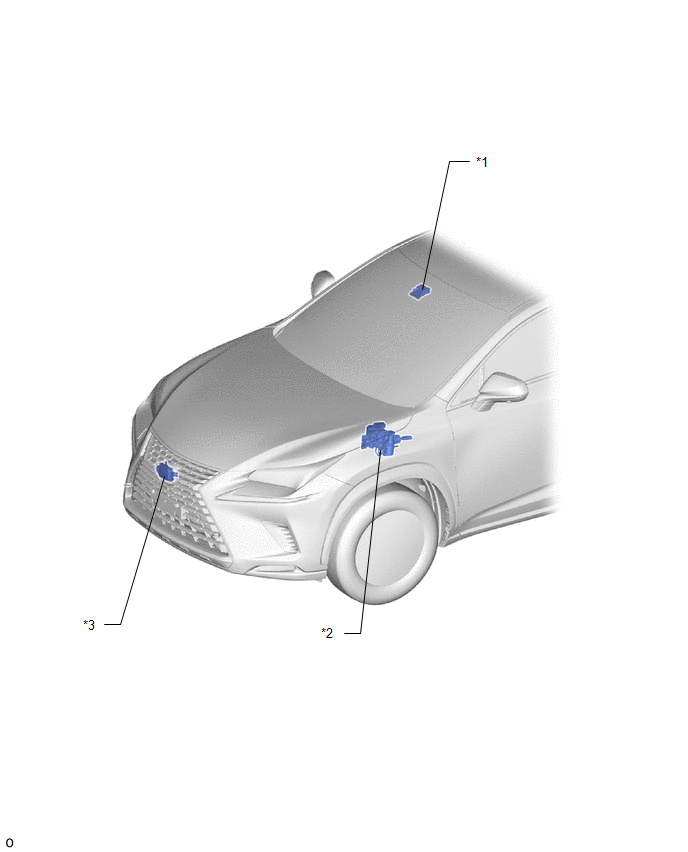
| *1 | FORWARD RECOGNITION CAMERA | *2 | BRAKE BOOSTER WITH MASTER CYLINDER ASSEMBLY - SKID CONTROL ECU |
| *3 | MILLIMETER WAVE RADAR SENSOR ASSEMBLY | - | - |
ILLUSTRATION
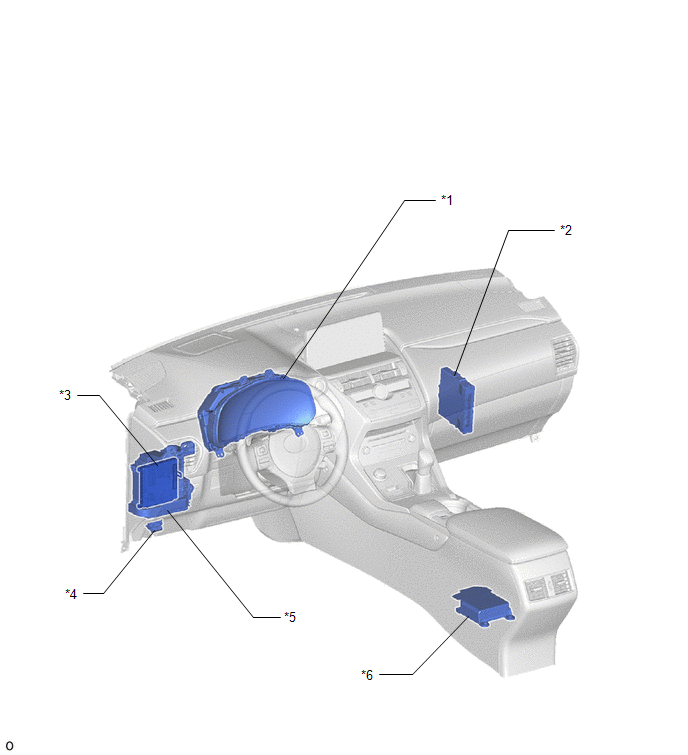
| *1 | COMBINATION METER ASSEMBLY | *2 | HYBRID VEHICLE CONTROL ECU |
| *3 | MAIN BODY ECU (MULTIPLEX NETWORK BODY ECU) | *4 | DLC3 |
| *5 | INSTRUMENT PANEL JUNCTION BLOCK ASSEMBLY - ECU-IG NO.2 FUSE | *6 | AIRBAG ECU ASSEMBLY |
READ NEXT:
 System Diagram
SYSTEM DIAGRAM
Customize Parameters
CUSTOMIZE PARAMETERS CUSTOMIZE ROAD SIGN ASSIST SYSTEM NOTICE: Be sure to make a note of the current settings before customizing. (a) Customizing with the multi-information display (1) Turn the power
Utility
UTILITY NOTICE: If the forward recognition camera has been replaced due to a malfunction in the road sign assist system, be sure to perform forward recognition camera adjustment. Otherwise all systems
SEE MORE:
Outside Vehicle
General MaintenanceGENERAL MAINTENANCE CAUTION / NOTICE / HINT
These are maintenance and inspection items that are considered to be the owner's responsibility.
The owner can do them or they can have them done at a service center. These items include those that should be checked on a daily basis,
Rear Power Window RH does not Operate with Rear Power Window Switch RH
DESCRIPTION When the power switch is on (IG), the rear power window regulator motor assembly RH is operated by the rear power window regulator switch assembly (for rear RH door). The rear power window regulator motor assembly RH has motor, regulator and ECU functions. WIRING DIAGRAM CAUTION / NOTIC
© 2016-2026 Copyright www.lexunx.com
