
Lexus NX: System Diagram
Lexus NX Service Manual / Engine & Hybrid System / Cruise Control / Lane Tracing Assist System / System Diagram
SYSTEM DIAGRAM
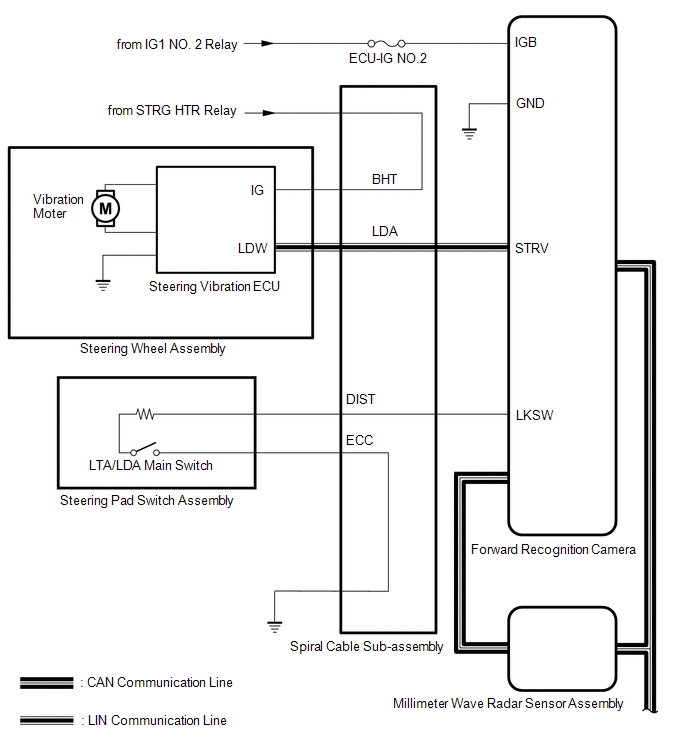
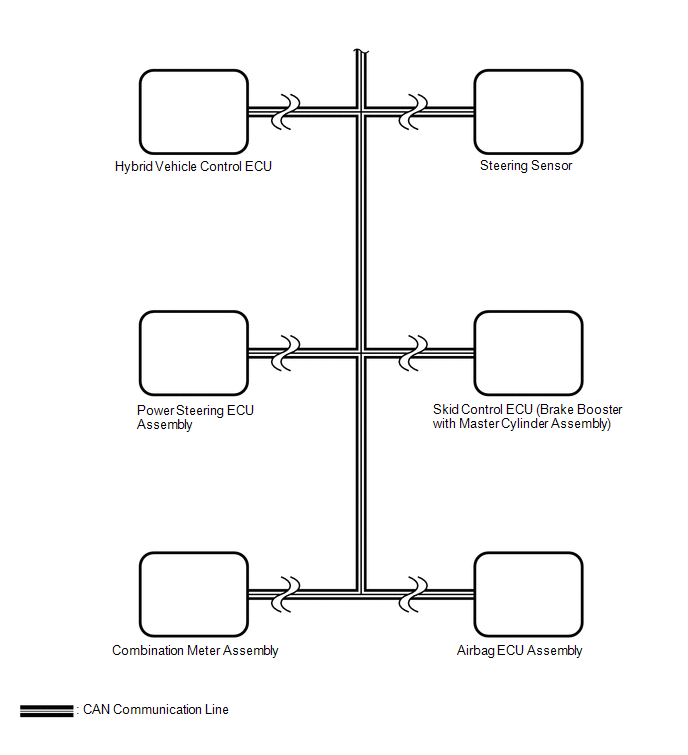
READ NEXT:
 How To Proceed With Troubleshooting
CAUTION / NOTICE / HINT HINT:
Use these procedures to troubleshoot the lane tracing assist system.
*: Use the Techstream.
PROCEDURE 1. VEHICLE BROUGHT TO WORKSHOP
NEXT
Customize Parameters
CUSTOMIZE PARAMETERS CUSTOMIZE LANE TRACING ASSIST SYSTEM (w/ Lane Centering Function) NOTICE:
When the customer requests a change in a function, first make sure that the function can be customized
Problem Symptoms Table
PROBLEM SYMPTOMS TABLE NOTICE:
If no problem symptoms are found when a DTC is output in the DTC check on the lane tracing assist, check each symptom by checking the suspected areas in the order the
SEE MORE:
Inspection
INSPECTION PROCEDURE 1. INSPECT CLEARANCE LIGHT ASSEMBLY LH (a) Apply battery voltage to the connector and check the light illumination condition. OK: Condition Specified Condition Battery positive (+) → 3 (DRL) Battery negative (-) → 2 (E) LED illuminates Battery positive (+)
Installation
INSTALLATION PROCEDURE 1. INSTALL SERVICE PLUG GRIP CAUTION: Wear insulating gloves. NOTICE: Before connecting the service plug, check that no parts and tools remain and that the high voltage terminals and connectors are connected securely. (a) Wear insulated gloves and install the service plug grip
© 2016-2026 Copyright www.lexunx.com
