
Lexus NX: Installation
INSTALLATION
PROCEDURE
1. INSTALL SHIFT LEVER ASSEMBLY
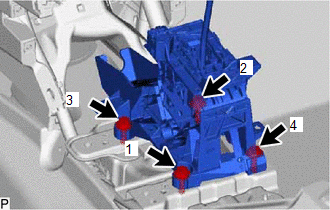
(a) Temporarily install the shift lever assembly with the 4 bolts.
| (b) Tighten the bolts in the order shown in the illustration. Torque: 12 N·m {122 kgf·cm, 9 ft·lbf} |
|
(c) Install the nut to the shift lever assembly.
(d) Connect the 2 clamps.
(e) Connect the shift lock control ECU connector.
(f) Connect the transmission control switch connector.
2. CONNECT TRANSMISSION CONTROL CABLE ASSEMBLY
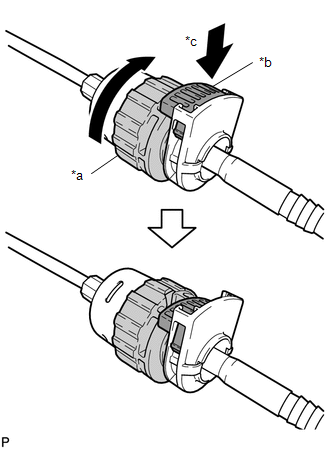
| (a) Turn the nut of the transmission control cable 180° clockwise. While holding the nut in place, push in the stopper to lock the nut. NOTICE: Do not over-rotate the nut as it will come off the internal spring and the transmission control cable will not be reusable. HINT: If the stopper cannot be pushed in, slightly turn the nut clockwise and then push in the stopper again. |
|
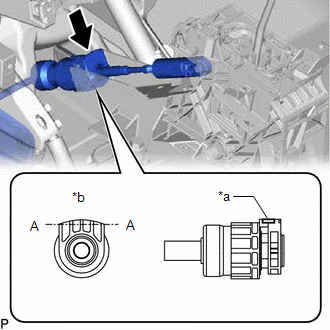
| (b) Connect the outer part of the transmission control cable assembly to the shift lever assembly. NOTICE: After installation, check that the outer part of the cable lock is protruding beyond portion A-A as shown in the illustration. |
|
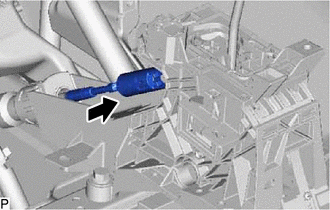
| (c) Connect the end of the transmission control cable assembly to the shift lever assembly. NOTICE:
|
|
3. INSPECT SHIFT LEVER POSITION
Click here .gif)
4. ADJUST SHIFT LEVER POSITION
Click here
5. INSTALL REAR CONSOLE BOX ASSEMBLY (w/o ASC System)
Click here
6. INSTALL NO. 1 SPEAKER WITH BOX ASSEMBLY (w/ ASC System)
Click here
READ NEXT:
 Components
COMPONENTS ILLUSTRATION *1 NO. 1 ENGINE UNDER COVER ASSEMBLY - - ILLUSTRATION *1 SHIFT LEVER POSITION SENSOR *2 TRANSMISSION CONTROL CABLE ASSEMBLY *3 CONTROL SHAFT LEVER
Removal
REMOVAL PROCEDURE 1. REMOVE NO. 1 ENGINE UNDER COVER ASSEMBLY Click here 2. DISCONNECT TRANSMISSION CONTROL CABLE ASSEMBLY (a) Remove the nut and disconnect the transmission control cable assem
SEE MORE:
How To Proceed With Troubleshooting
CAUTION / NOTICE / HINT HINT:
Use these procedures to troubleshoot the smart access system with push-button start (for start function).
*: Use the Techstream.
PROCEDURE 1. VEHICLE BROUGHT TO WORKSHOP
NEXT 2. CUSTOMER PROBLEM ANALYSIS HINT:
In troubleshoo
XM Tuner Antenna Disconnected (B15FE,B15FF)
DESCRIPTION These DTCs are stored when a malfunction occurs in the roof antenna assembly which is connected to the radio receiver assembly. DTC No. Detection Item DTC Detection Condition Trouble Area B15FE XM Tuner Antenna Disconnected The roof antenna assembly is not connected.
