
Lexus NX: Navigation Ecu
Lexus NX Service Manual / Audio & Visual & Telematics / Navigation / Multi Info Display / Navigation Ecu
Components
COMPONENTS
ILLUSTRATION
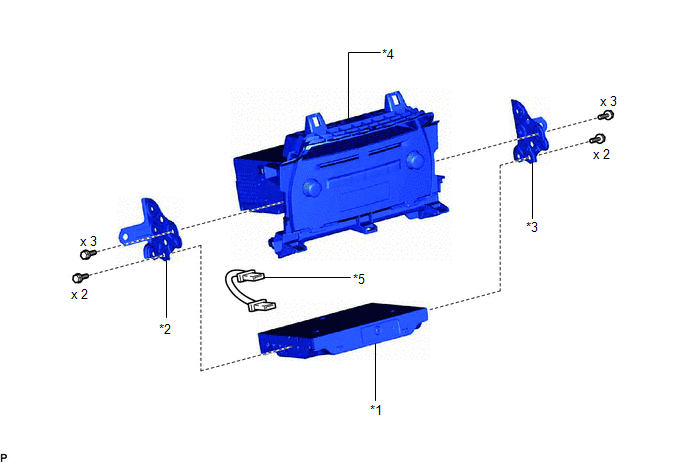
| *1 | NAVIGATION ECU | *2 | NO. 1 RADIO BRACKET |
| *3 | NO. 2 RADIO BRACKET | *4 | RADIO RECEIVER ASSEMBLY WITH BRACKET |
| *5 | NAVIGATION WIRE | - | - |
Removal
REMOVAL
PROCEDURE
1. REMOVE RADIO RECEIVER ASSEMBLY WITH BRACKET
Click here .gif)
2. REMOVE NO. 1 RADIO BRACKET
Click here
3. REMOVE NO. 2 RADIO BRACKET
Click here
4. REMOVE NAVIGATION ECU
| (a) Disconnect the connectors and remove the navigation wire. |
|
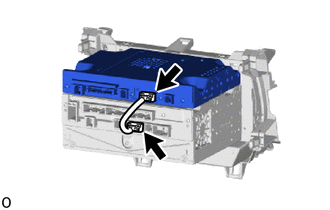
(b) Remove the navigation ECU.
Installation
INSTALLATION
PROCEDURE
1. INSTALL NAVIGATION ECU
| (a) Connect the connectors and install a navigation ECU in the mounting location. |
|
.png)
2. INSTALL NO. 1 RADIO BRACKET
Click here .gif)
3. INSTALL NO. 2 RADIO BRACKET
Click here
4. INSTALL RADIO RECEIVER ASSEMBLY WITH BRACKET
Click here
READ NEXT:
 Precaution
PRECAUTION PRECAUTION FOR DISCONNECTING CABLE FROM NEGATIVE AUXILIARY BATTERY TERMINAL NOTICE: After the power switch is turned off, the radio receiver assembly records various types of memory and set
Parts Location
PARTS LOCATION ILLUSTRATION *A w/ Parking Assist Monitor System *B w/ Panoramic View Monitor System *1 NO. 2 ENGINE ROOM RELAY BLOCK - DCM FUSE (w/ Manual [SOS] Switch) - ECU-B NO.1 FU
SEE MORE:
Short in Side Squib (RH) Circuit (B1820-B1823)
DESCRIPTION The front side squib RH circuit consists of the airbag ECU assembly and front seat airbag assembly RH. This circuit instructs the SRS to deploy when deployment conditions are met. These DTCs are stored when a malfunction is detected in the front side squib RH circuit. DTC No. Detect
CAN Communication Failure (Message Registry) (U1000)
DESCRIPTION This DTC is stored when the rear television camera assembly judges that it has an internal CAN malfunction. DTC No. Detection Item DTC Detection Condition Trouble Area U1000 CAN Communication Failure (Message Registry) Can communication failure (message registry) Rear
© 2016-2026 Copyright www.lexunx.com
