
Lexus NX: Parts Location
Lexus NX Service Manual / Vehicle Exterior / Acoustic Vehicle Alerting System / Acoustic Vehicle Alerting System / Parts Location
PARTS LOCATION
ILLUSTRATION
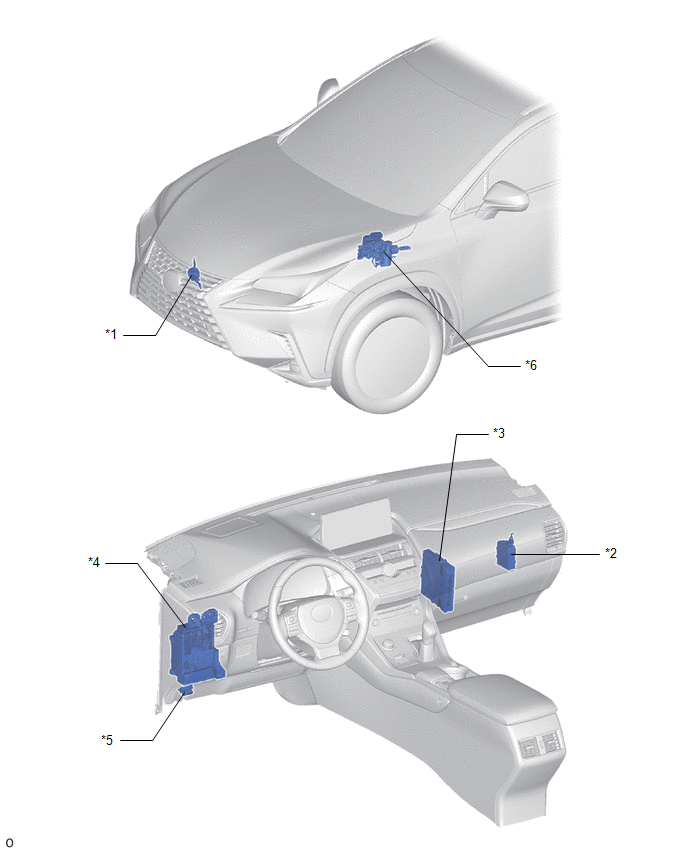
| *1 | VEHICLE APPROACHING SPEAKER ASSEMBLY | *2 | VEHICLE APPROACHING SPEAKER CONTROLLER |
| *3 | HYBRID VEHICLE CONTROL ECU | *4 | INSTRUMENT PANEL JUNCTION BLOCK ASSEMBLY ASSEMBLY - ECU-IG NO.3 FUSE |
| *5 | DLC3 | *6 | BRAKE BOOSTER WITH MASTER CYLINDER ASSEMBLY - SKID CONTROL ECU |
READ NEXT:
 System Diagram
SYSTEM DIAGRAM
System Description
SYSTEM DESCRIPTION Vehicle Proximity Notification System (a) When the vehicle is being driven quietly using the motor only, the vehicle proximity notification system outputs a warning sound from the v
How To Proceed With Troubleshooting
CAUTION / NOTICE / HINT HINT:
Use the following procedure to troubleshoot the vehicle proximity notification system.
*: Use the GTS.
PROCEDURE 1. VEHICLE BROUGHT TO WORKSHOP
NEX
SEE MORE:
Inspection
INSPECTION PROCEDURE 1. INSPECT FUEL LID WITH MOTOR LOCK ASSEMBLY (a) Check the operation of the fuel lid with lock motor assembly. (1) Apply auxiliary battery voltage to the fuel lid with motor lock assembly connector, and check that the fuel lid with motor lock assembly operates smoothly as fol
Components
COMPONENTS ILLUSTRATION *1 DECK FLOOR BOX LH *2 NO. 3 DECK BOARD SUB-ASSEMBLY *3 REAR DECK FLOOR BOX *4 NEGATIVE AUXILIARY BATTERY TERMINAL N*m (kgf*cm, ft.*lbf): Specified torque - - ILLUSTRATION *1 DECK BOARD ASSEMBLY *2 DECK FLOOR BOX RH *3 NO. 1
© 2016-2026 Copyright www.lexunx.com
