
Lexus NX: Removal
REMOVAL
PROCEDURE
1. REMOVE DECK BOARD ASSEMBLY
Click here .gif)
2. REMOVE NO. 3 DECK BOARD SUB-ASSEMBLY
Click here
3. REMOVE REAR DECK FLOOR BOX
Click here
4. REMOVE DECK FLOOR BOX LH
Click here
5. PRECAUTION
CAUTION:
Be sure to read Precaution thoroughly before serving.
Click here
NOTICE:
After turning the power switch off, there may be a waiting time before disconnecting the negative (-) auxiliary battery terminal.
Click here
6. DISCONNECT CABLE FROM NEGATIVE AUXILIARY BATTERY TERMINAL
CAUTION:
- Wait at least 90 seconds after disconnecting the cable from the negative (-) auxiliary battery terminal to disable the SRS system.
- If the airbag deploys for any reason, it may cause a serious accident.
7. REMOVE DCM (TELEMATICS TRANSCEIVER)
Click here
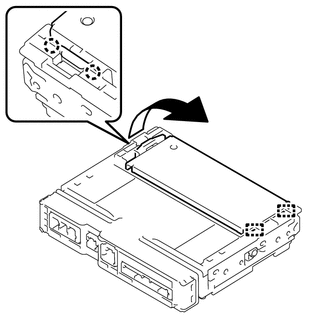
8. REMOVE TRANSCEIVER COVER
| (a) Detach the 2 claws and 2 guides and remove the transceiver cover as shown in the illustration. |
|
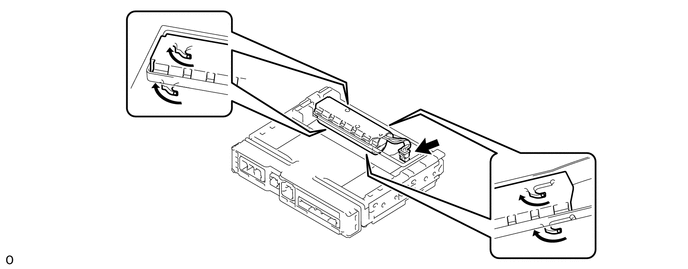
9. REMOVE MOBILEPHONE BATTERY
CAUTION:
- Do not reuse dropped or damaged parts.
- Wear gloves when contacting parts that have been dropped from a height of 1 m or higher.
- There may be an internal short or the temperature may increase to 100°C or higher due to the shock from being dropped.
- If an internal short has occurred, gas may be discharged. Therefore, if there is even a small amount of heat, maintain a distance of 3 m or more from the vehicle and wait for 1 minute or longer.
(a) Disconnect the connector and remove the mobilephone battery as shown in the illustration.
READ NEXT:
 Installation
INSTALLATION PROCEDURE 1. INSTALL MOBILEPHONE BATTERY CAUTION:
Do not reuse dropped or damaged parts.
Wear gloves when contacting parts that have been dropped from a height of 1 m or higher.
Th
Precaution
PRECAUTION WHEN DISCONNECTING AUXILIARY BATTERY CABLE NOTICE:
After turning the power switch off, waiting time may be required before disconnecting the cable from the negative (-) auxiliary battery
SEE MORE:
Freeze Frame Data
FREEZE FRAME DATA FREEZE FRAME DATA (a) Whenever a DTC is detected, the headlight ECU sub-assembly or front recognition camera stores the current vehicle (sensor) state as freeze frame data. CHECK FREEZE FRAME DATA (a) Connect the Techstream to the DLC3. (b) Turn the power switch on (IG). (c) Turn t
Freeze Frame Data
FREEZE FRAME DATA DESCRIPTION The ECM records vehicle and driving condition information as freeze frame data the moment a DTC is stored. When troubleshooting, freeze frame data can be helpful in determining whether the vehicle was moving or stationary, whether the engine was warmed up or not, wheth
