
Lexus NX: Removal
REMOVAL
CAUTION / NOTICE / HINT
HINT:
- Use the same procedure for the LH side and RH side.
- The following procedure is for the LH side.
PROCEDURE
1. REMOVE FRONT TIRE
Click here .gif)
2. REMOVE FRONT SPEED SENSOR LH (w/ AVS)
| (a) Disconnect the connector. |
|
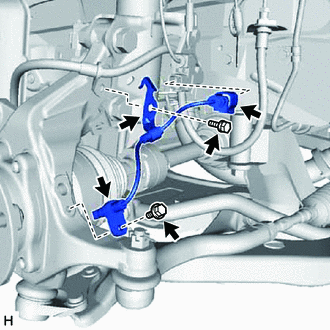
(b) Remove the bolt and sensor clamp from the steering knuckle.
(c) Remove the bolt and front speed sensor LH from the steering knuckle.
NOTICE:
Prevent foreign matter from attaching to the front speed sensor LH tip.
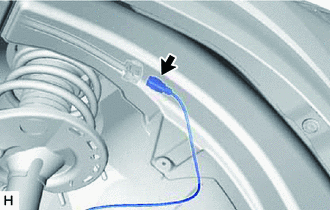
3. REMOVE FRONT SKID CONTROL SENSOR WIRE LH (w/ AVS)
| (a) Fold back the fender liner and disconnect the connector. |
|
| (b) Remove the clamp. |
|
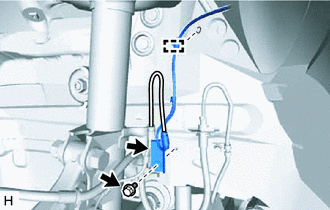
(c) Remove the bolt and sensor clamp from the side member.
| (d) Disconnect the connector from the absorber control actuator. |
|
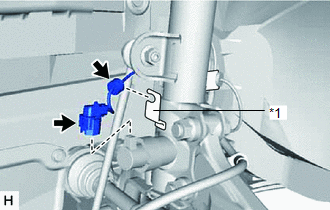
(e) Remove the grommet from the absorber bracket.
| (f) Remove the bolt, hook and sensor clamp. |
|
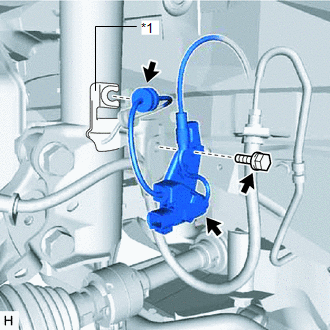
(g) Remove the grommet from the absorber bracket.
4. REMOVE FRONT SPEED SENSOR LH (w/o AVS)
| (a) Fold back the fender liner and disconnect the connector. |
|
| (b) Remove the clamp. |
|
(c) Remove the bolt and sensor clamp from the side member.
| (d) Remove the clamp. |
|
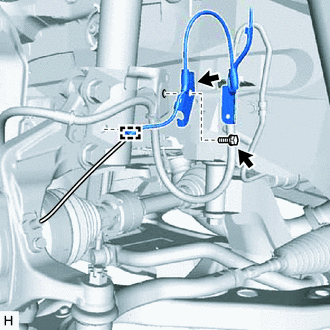
(e) Remove the bolt and sensor clamp from the absorber bracket.
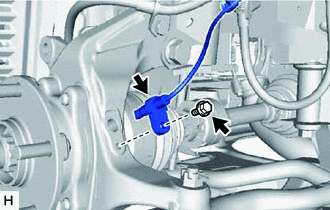
| (f) Remove the bolt and front speed sensor LH from the steering knuckle. NOTICE: Prevent foreign matter from attaching to the front speed sensor LH tip. |
|
READ NEXT:
 Installation
INSTALLATION CAUTION / NOTICE / HINT HINT:
Use the same procedure for the LH side and RH side.
The following procedure is for the LH side.
PROCEDURE 1. INSTALL FRONT SKID CONTROL SENSOR WIRE L
Components
COMPONENTS ILLUSTRATION *A w/ AVS - - *1 REAR SPEED SENSOR LH - - N*m (kgf*cm, ft.*lbf): Specified torque - - ILLUSTRATION *A w/o AVS - - *1 REAR SPEE
SEE MORE:
Terminals Of Ecu
TERMINALS OF ECU CLEARANCE WARNING ECU ASSEMBLY (a) Disconnect the I20 clearance warning ECU assembly connector. (b) Measure the voltage and resistance on the wire harness side connector according to the value(s) in the table below. Terminal No. (Symbol) Wiring Color Terminal Description C
Immobiliser System does not Operate Properly
DESCRIPTION The immobiliser system compares the ID code that is registered in the certification ECU (smart key ECU assembly) with the ID code of the transponder chip that is embedded in the electrical key transmitter sub-assembly. WIRING DIAGRAM Click here CAUTION / NOTICE / HINT NOTICE:
When
