
Lexus NX: Removal
REMOVAL
CAUTION / NOTICE / HINT
NOTICE:
- Do not replace the spiral cable with the battery connected and the power switch on (IG).
- Do not rotate the spiral cable when the following conditions are met: 1) The steering wheel is removed, 2) the battery is connected, and 3) thepower switch on (IG).
- Ensure that the steering wheel assembly is installed and aligned straight when inspecting the steering sensor.
- Do not remove the steering sensor from the spiral cable.
PROCEDURE
1. REMOVE STEERING WHEEL ASSEMBLY
Click here .gif)
2. REMOVE CRUISE CONTROL MAIN SWITCH
Click here
3. REMOVE STEERING PAD SWITCH ASSEMBLY
Click here
4. REMOVE SHIFT PADDLE SWITCH (TRANSMISSION SHIFT SWITCH ASSEMBLY)
| (a) Disengage the guide to disconnect the No. 1 switch wire from the steering wheel assembly. |
|
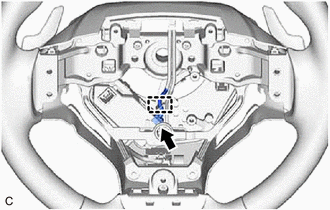
(b) Disconnect the No. 1 switch wire connector.
| (c) Remove the 4 screws, and disconnect the 2 shift paddle switches (transmission shift switch assemblies) from the steering wheel assembly. |
|
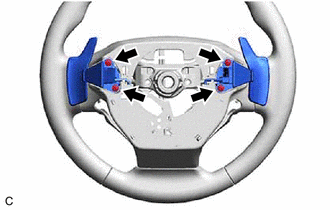
| (d) Disconnect the 2 shift paddle switch (transmission shift switch assembly) connectors to remove the 2 shift paddle switches (transmission shift switch assemblies) from the No. 1 switch wire. |
|
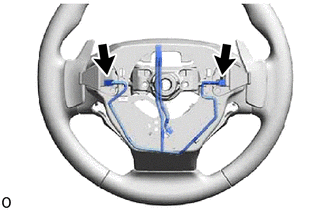
| (e) Disengage the 6 guides to remove the 2 shift paddle switches (transmission shift switch assemblies) with No. 1 switch wire from the steering wheel assembly. |
|
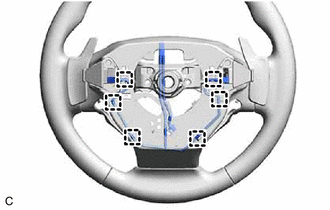
READ NEXT:
 Inspection
INSPECTION PROCEDURE 1. INSPECT SHIFT PADDLE SWITCH (TRANSMISSION SHIFT SWITCH ASSEMBLY) (a) Measure the resistance according to the value(s) in the table below. Standard Resistance: Shift Paddle
Installation
INSTALLATION CAUTION / NOTICE / HINT NOTICE:
Do not replace the spiral cable with the battery connected and the power switch on (IG).
Do not rotate the spiral cable when the following conditions
SEE MORE:
Removal
REMOVAL PROCEDURE 1. REMOVE REAR SEAT ASSEMBLY (a) for Power Seat: Click here (b) for Manual Seat: Click here 2. REMOVE REAR FLOOR FINISH PLATE Click here 3. REMOVE REAR DOOR OPENING TRIM WEATHERSTRIP LH Click here 4. REMOVE UPPER DECK TRIM SIDE BOARD LH Click here 5. REMOVE ROPE H
Throttle Pedal Position Sensor / Switch "A" Circuit (P0120-P0123,P0220,P0222,P0223,P2135)
DESCRIPTION HINT: These DTCs relate to the throttle position sensor. The throttle position sensor is mounted on the throttle body with motor assembly and detects the opening angle of the throttle valve. This sensor is a non-contact type sensor. It uses Hall-effect elements in order to yield accurate
