
Lexus NX: Voice Guidance does not Function
WIRING DIAGRAM
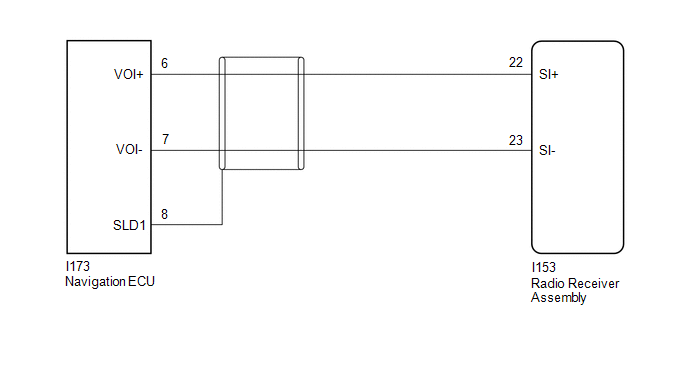
CAUTION / NOTICE / HINT
NOTICE:
When replacing the radio receiver assembly or navigation ECU, always replace it with a new one.
If a radio receiver assembly or navigation ECU which was installed to another vehicle is used, the following may occur:
- A communication malfunction DTC may be stored.
- The radio receiver assembly or navigation ECU may not operate normally.
PROCEDURE
| 1. | CHECK VOICE GUIDANCE SETTING |
(a) Check that the voice guidance settings are not off.
OK:
Voice guidance settings are not off.
| NG | .gif) | CHANGE VOICE GUIDANCE SETTINGS TO ON |
|
.gif)
| 2. | CHECK HARNESS AND CONNECTOR (RADIO RECEIVER ASSEMBLY - NAVIGATION ECU) |
(a) Disconnect the I153 radio receiver assembly connector.
(b) Disconnect the I173 navigation ECU connector.
(c) Measure the resistance according to the value(s) in the table below.
Standard Resistance:
| Tester Connection | Condition | Specified Condition |
|---|---|---|
| I153-22 (SI+) - I173-6 (VOI+) | Always | Below 1 Ω |
| I153-23 (SI-) - I173-7 (VOI-) | Always | Below 1 Ω |
| I153-22 (SI+) or I173-6 (VOI+) - Body ground | Always | 10 kΩ or higher |
| I153-23 (SI-) or I173-7 (VOI-) - Body ground | Always | 10 kΩ or higher |
| I173-8 (SLD1) - Body ground | Always | 10 kΩ or higher |
| OK | | PROCEED TO NEXT SUSPECTED AREA SHOWN IN PROBLEM SYMPTOMS TABLE |
.gif)
| NG | | REPAIR OR REPLACE HARNESS OR CONNECTOR |
READ NEXT:
 Route cannot be Calculated
PROCEDURE 1. SET DESTINATION (a) Set another destination and check if the system can calculate the route correctly. OK: Route can be correctly calculated. OK NORMAL OPERATION NG
Voice is not Recognized
PROCEDURE 1. CHECK CONDITION (a) While paying attention to the condition of the spoken voice command, perform a voice recognition operation. OK: Voice command is recognized normally. HINT:
Cellular Phone Registration Failure
CAUTION / NOTICE / HINT NOTICE: When replacing the radio receiver assembly, always replace it with a new one. If a radio receiver assembly which was installed to another vehicle is used, the following
SEE MORE:
D-Seat ECU Vehicle Information Reading/Writing Process Malfunction (B15F8)
DESCRIPTION This DTC is stored when items controlled by the position control ECU assembly (driver seat) cannot be customized via the navigation system vehicle customization screen. HINT: The position control ECU assembly (driver seat) controls the front power seat control system (w/ Memory) related
All Power Windows do not Operate with Driver Side Door Key Cylinder or Wireless Transmitter
DESCRIPTION Wireless Transmitter-linked Function
When a key switch is pushed: 1) the electrical key and TMPS receiver assembly receives the wireless door lock signal; 2) the door control receiver sends a signal to the main body ECU (multiplex network body ECU) through the certification ECU (smart
