
Lexus NX: Components
COMPONENTS
ILLUSTRATION
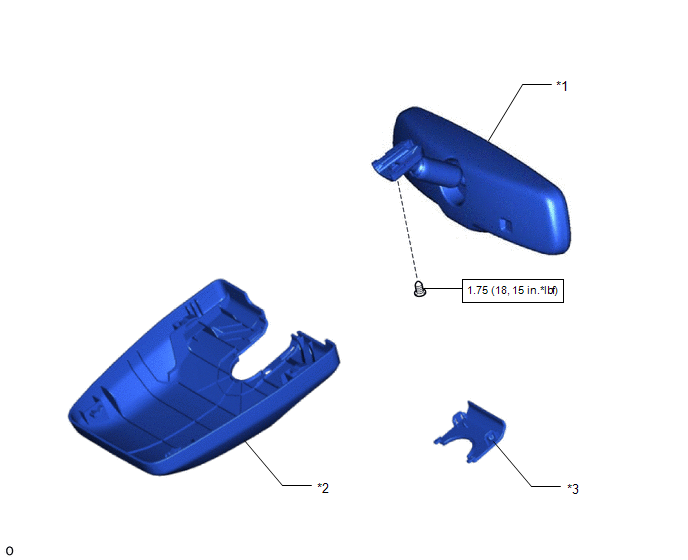
| *1 | INNER REAR VIEW MIRROR ASSEMBLY | *2 | NO. 1 FORWARD RECOGNITION COVER |
| *3 | NO. 2 FORWARD RECOGNITION COVER | - | - |
.png) | N*m (kgf*cm, ft.*lbf): Specified torque | - | - |
READ NEXT:
 System Diagram
SYSTEM DIAGRAM
Calibration
CALIBRATION SELECT COMPASS DISPLAY MODE (w/ Compass) (a) The compass switch allows selection of the compass display. *1 Compass Display *2 Compass Switch PERFORM CALIBRATION (w/ Compass
Problem Symptoms Table
PROBLEM SYMPTOMS TABLE HINT: Use the table below to help determine the cause of problem symptoms. If multiple suspected areas are listed, the potential causes of the symptoms are listed in order of pr
SEE MORE:
Fail-safe Chart
FAIL-SAFE CHART FAIL-SAFE FUNCTION (a) When a malfunction occurs in the pre-collision system, a message will be displayed on the multi-information display and the pre-collision system will be disabled depending on the malfunction. Warning Message Cause DTC/RoB Conditions to Return to Normal
Components
COMPONENTS ILLUSTRATION *1 FORWARD RECOGNITION CAMERA *2 FORWARD RECOGNITION LATCH *3 NO. 1 FORWARD RECOGNITION COVER *4 NO. 2 FORWARD RECOGNITION COVER
© 2016-2026 Copyright www.lexunx.com
