
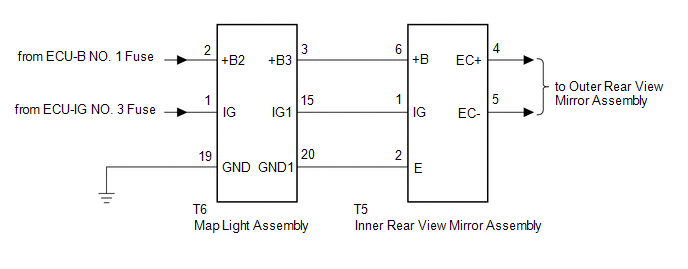
Lexus NX: System Diagram
SYSTEM DIAGRAM
READ NEXT:
 Calibration
CALIBRATION SELECT COMPASS DISPLAY MODE (w/ Compass) (a) The compass switch allows selection of the compass display. *1 Compass Display *2 Compass Switch PERFORM CALIBRATION (w/ Compass
Problem Symptoms Table
PROBLEM SYMPTOMS TABLE HINT: Use the table below to help determine the cause of problem symptoms. If multiple suspected areas are listed, the potential causes of the symptoms are listed in order of pr
Removal
REMOVAL PROCEDURE 1. REMOVE NO. 2 FORWARD RECOGNITION COVER Click here 2. REMOVE NO. 1 FORWARD RECOGNITION COVER Click here 3. REMOVE INNER REAR VIEW MIRROR ASSEMBLY (a) Disconnect the connec
SEE MORE:
Reassembly
REASSEMBLY PROCEDURE 1. INSTALL REAR BUMPER PAD HINT:
When installing the rear bumper pad, heat the rear bumper cover and rear bumper pad using a heat light.
Use the same procedure described for the other side.
Standard: Item Temperature Rear Bumper Cover 20 to 30°C (68 to 86°F
On-vehicle Inspection
ON-VEHICLE INSPECTION PROCEDURE 1. INSPECT CAMSHAFT TIMING OIL CONTROL VALVE ASSEMBLY (a) Connect the Techstream to the DLC3. (b) Turn the Techstream on. (c) Put the engine in inspection mode (maintenance mode). Click here (d) Start the engine. (e) Warm up the engine. (f) Enter the following menus
© 2016-2026 Copyright www.lexunx.com
