
Lexus NX: Components
COMPONENTS
ILLUSTRATION
.png)
| *1 | NO. 1 ENGINE UNDER COVER ASSEMBLY | - | - |
ILLUSTRATION
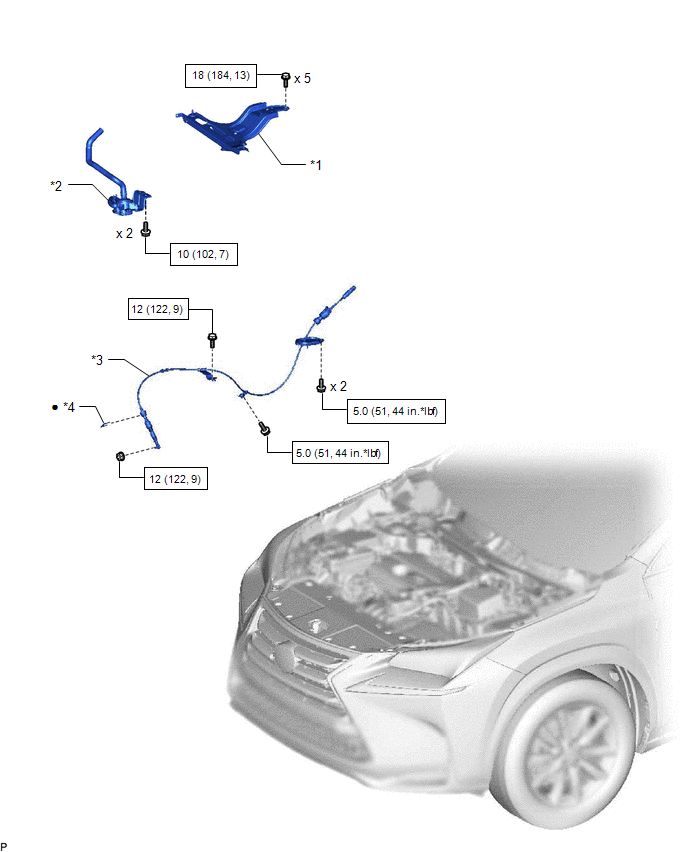
| *1 | INVERTER BRACKET ASSEMBLY | *2 | INVERTER WATER PUMP WITH MOTOR ASSEMBLY |
| *3 | TRANSMISSION CONTROL CABLE ASSEMBLY | *4 | CLIP |
.png) | N*m (kgf*cm, ft.*lbf): Specified torque | ● | Non-reusable part |
READ NEXT:
 Removal
REMOVAL PROCEDURE 1. REMOVE NO. 1 SPEAKER WITH BOX ASSEMBLY (w/ ASC System) Click here 2. REMOVE REAR CONSOLE BOX ASSEMBLY (w/o ASC System) Click here 3. DISCONNECT TRANSMISSION CONTROL CABLE ASS
Adjustment
ADJUSTMENT PROCEDURE 1. INSPECT SHIFT LEVER POSITION (a) While moving the shift lever from N to each position, check that the lever moves smoothly and that the shift position indicator comes on proper
Installation
INSTALLATION PROCEDURE 1. INSTALL TRANSMISSION CONTROL CABLE ASSEMBLY NOTICE: Before installing the transmission control cable assembly, check that the shift lever position sensor and the shift lever
SEE MORE:
AVC-LAN Circuit
DESCRIPTION Each audio system component connected to the AVC-LAN (communication bus) transfers switch signals using the audio visual communication local area network. If a short to +B or short to ground occurs in the AVC-LAN, the audio system will not function normally because communication is not p
Inspection
INSPECTION PROCEDURE 1. INSPECT SHIFT LEVER POSITION SENSOR (a) Measure the resistance according to the value(s) in the table below. Standard Resistance: Tester Connection Condition Specified Condition 7 (+B) - 3 (PR) Shift lever in P Below 1 Ω 7 (+B) - 4 (PNB) Below 1 Ω
© 2016-2026 Copyright www.lexunx.com
