
Lexus NX: Electronic key battery
Replace the battery with a new one if it is depleted.
■When the card key battery needs to be replaced (if equipped) The battery for the card key is available only at Lexus dealers. Your Lexus dealer can replace the battery for you.
■If the electronic key battery is depleted
The following symptoms may occur:
- The smart access system with push-button start and wireless remote control will not function properly.
- The operational range will be reduced.
Items to prepare
Prepare the following before replacing the battery:
- Flathead screwdriver
- Lithium battery CR2032
■Use a CR2032 lithium battery
- Batteries can be purchased at your Lexus dealer, local electrical appliance shops or camera stores.
- Replace only with the same or equivalent type recommended by the manufacturer.
- Dispose of used batteries according to the local laws.
Replacing the battery
1. Take out the mechanical key.
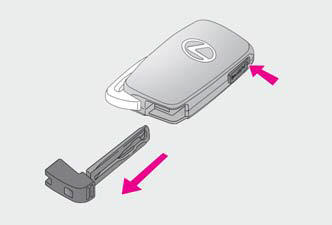
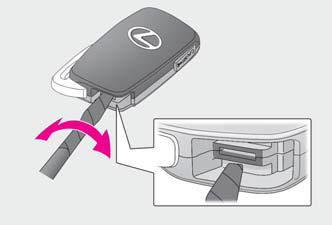
2. Remove the cover.
To prevent damage to the key, cover the tip of the flathead screwdriver with a tape.
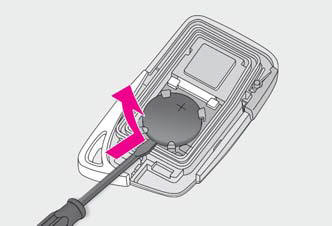
3. Remove the depleted battery.
Insert a new battery with the "+" terminal facing up.
WARNING
■Removed battery and other parts These parts are small and if swallowed by a child, they can cause choking. Keep away from children. Failure to do so could result in death or serious injury.
NOTICE
■For normal operation after replacing the battery Observe the following precautions to prevent accidents:
- Always work with dry hands.
Moisture may cause the battery to rust.
- Do not touch or move any other component inside the remote control.
- Do not bend either of the battery terminals.
READ NEXT:
 Checking and replacing fuses
If any of the electrical components
do not operate, a fuse may have
blown. If this happens, check and
replace the fuses as necessary.
Checking and replacing fuses
1. Turn the power switch off.
Headlight aim
Vertical movement adjusting
bolts
Type A
Adjustment bolt A
Adjustment bolt B
Type B
Adjustment bolt A
Adjustment bolt B
Before checking the headlight
aim
Make sure the veh
Light bulbs
You may replace the following bulbs
by yourself.
The difficulty level of replacement
varies depending on the bulb. If
necessary bulb replacement seems
difficult to perform, contact your
Lexus
SEE MORE:
System Description
SYSTEM DESCRIPTION FUNCTION OF MAIN COMPONENTS Component Function Multiplex tilt and telescopic ECU This ECU sends a control signal to the tilt motor and telescopic motor, based on signals from each switch, to adjust the steering position. Tilt motor (Built-in tilt position sensor)
G Sensor Failure (C1647)
DESCRIPTION The clearance warning sonar ECU assembly communicates with the airbag ECU assembly (yaw rate and acceleration sensor) via CAN communication, and if it is determined that the airbag ECU assembly (yaw rate and acceleration sensor) is malfunctioning, DTC C1647 is stored. DTC No. Detect
