
Lexus NX: Footwell Light
Components
COMPONENTS
ILLUSTRATION
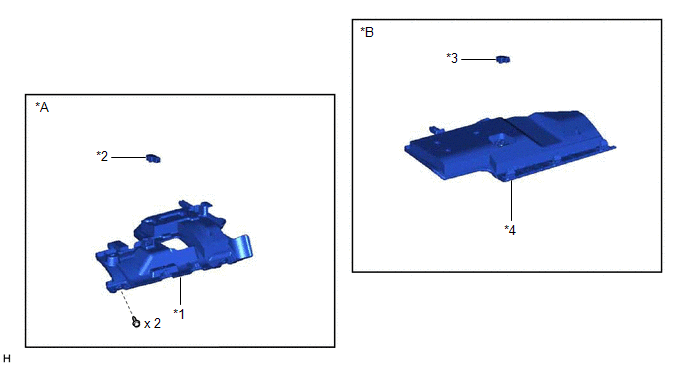
| *A | for Driver Side | *B | for Front Passenger Side |
| *1 | NO. 1 INSTRUMENT PANEL UNDER COVER SUB-ASSEMBLY | *2 | NO. 1 INTERIOR ILLUMINATION LIGHT ASSEMBLY LH |
| *3 | NO. 1 INTERIOR ILLUMINATION LIGHT ASSEMBLY RH | *4 | NO. 2 INSTRUMENT PANEL UNDER COVER SUB-ASSEMBLY |
Removal
REMOVAL
PROCEDURE
1. DISCONNECT NO. 1 INSTRUMENT PANEL UNDER COVER SUB-ASSEMBLY (for Driver Side)
| (a) Remove the 2 screws. |
|
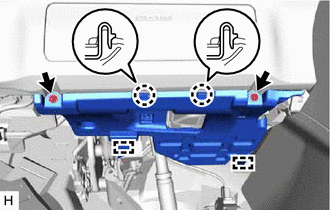
(b) Detach the 2 claws and 2 guides and disconnect the No. 1 instrument panel under cover sub-assembly.
2. REMOVE NO. 1 INTERIOR ILLUMINATION LIGHT ASSEMBLY LH (for Driver Side)
| (a) Disconnect the connector. |
|
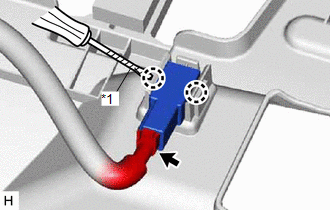
(b) Using a screwdriver, detach the 2 claws and remove the No. 1 interior illumination light assembly LH.
HINT:
Tape the screwdriver tip before use.
3. DISCONNECT NO. 2 INSTRUMENT PANEL UNDER COVER SUB-ASSEMBLY (for Front Passenger Side)
| (a) Using moulding remover A, detach the 3 claws and guide and disconnect the No. 2 instrument panel under cover sub-assembly. |
|
.png)
4. REMOVE NO. 1 INTERIOR ILLUMINATION LIGHT ASSEMBLY RH (for Front Passenger Side)
| (a) Disconnect the connector. |
|
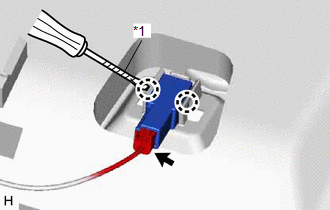
(b) Using a screwdriver, detach the 2 claws and remove the No. 1 interior illumination light assembly RH.
HINT:
Tape the screwdriver tip before use.
Inspection
INSPECTION
PROCEDURE
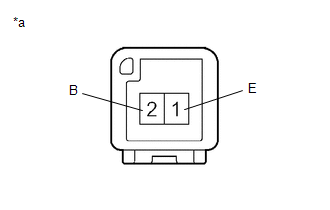
1. INSPECT NO. 1 INTERIOR ILLUMINATION LIGHT ASSEMBLY LH (for Driver Side)
| (a) Apply battery voltage to the connector and check the light illumination condition. OK:
If the result is not as specified, replace the No. 1 interior illumination light assembly LH. |
|
2. INSPECT NO. 1 INTERIOR ILLUMINATION LIGHT ASSEMBLY RH (for Front Passenger Side)
| (a) Apply battery voltage to the connector and check the light illumination condition. OK:
If the result is not as specified, replace the No. 1 interior illumination light assembly RH. |
|
Installation
INSTALLATION
PROCEDURE
1. INSTALL NO. 1 INTERIOR ILLUMINATION LIGHT ASSEMBLY LH (for Driver Side)
| (a) Attach the 2 claws to install the No. 1 interior illumination light assembly LH. |
|
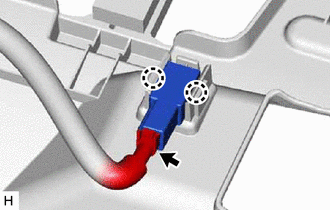
(b) Connect the connector.
2. CONNECT NO. 1 INSTRUMENT PANEL UNDER COVER SUB-ASSEMBLY (for Driver Side)
| (a) Attach the 2 guides and 2 claws to connect the No. 1 instrument panel under cover sub-assembly. |
|
.png)
(b) Install the 2 screws.
3. INSTALL NO. 1 INTERIOR ILLUMINATION LIGHT ASSEMBLY RH (for Front Passenger Side)
| (a) Attach the 2 claws to install the No. 1 interior illumination light assembly RH. |
|
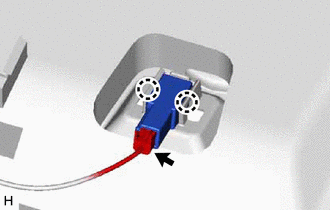
(b) Connect the connector.
4. CONNECT NO. 2 INSTRUMENT PANEL UNDER COVER SUB-ASSEMBLY (for Front Passenger Side)
| (a) Attach the guide and 3 claws to connect the No. 2 instrument panel under cover sub-assembly. |
|
.png)
READ NEXT:
 Front Door Courtesy Switch
ComponentsCOMPONENTS ILLUSTRATION *1 FRONT DOOR COURTESY LIGHT SWITCH ASSEMBLY - - N*m (kgf*cm, ft.*lbf): Specified torque - - RemovalREMOVAL CAUTION / NOTICE / HINT HINT:
Components
COMPONENTS ILLUSTRATION *1 DECK FLOOR BOX LH *2 NO. 3 DECK BOARD SUB-ASSEMBLY *3 REAR DECK FLOOR BOX *4 NEGATIVE AUXILIARY BATTERY TERMINAL N*m (kgf*cm, ft.*lbf): Specified
SEE MORE:
Installation
INSTALLATION PROCEDURE 1. INSTALL SHIFT LEVER POSITION SENSOR (a) Install the shift lever position sensor to the manual valve shaft. (b) Temporarily install the 2 bolts. (c) Install the lock plate and tighten the lock nut. Torque: 6.9 N·m {70 kgf·cm, 61 in·lbf} (d) Temporarily install the contro
Data List / Active Test
DATA LIST / ACTIVE TEST DATA LIST NOTICE: In the table below, the values listed under "Normal Condition" are reference values. Do not depend solely on these reference values when deciding whether a part is faulty or not. HINT: Using the Techstream to read the Data List allows the values or states of
