
Lexus NX: Installation
Lexus NX Service Manual / Vehicle Interior / Interior Panels / Trim / Combination Switch / Installation
INSTALLATION
PROCEDURE
1. INSTALL COMBINATION SWITCH ASSEMBLY (for Upper Side)
| (a) Attach the 4 claws to install the combination switch assembly. |
|
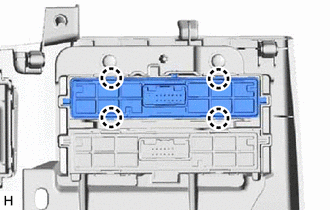
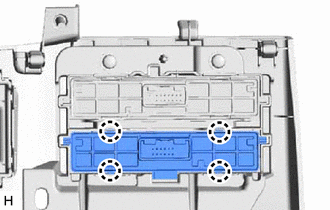
2. INSTALL NO. 2 COMBINATION SWITCH ASSEMBLY (for Lower Side)
| (a) Attach the 4 claws to install the No. 2 combination switch assembly. |
|
3. INSTALL LOWER NO. 1 INSTRUMENT PANEL FINISH PANEL
Click here .gif)
4. INSTALL NO. 1 INSTRUMENT PANEL UNDER COVER SUB-ASSEMBLY
Click here
5. INSTALL NO. 1 INSTRUMENT PANEL SAFETY PAD SUB-ASSEMBLY
Click here
6. INSTALL INSTRUMENT SIDE PANEL LH
Click here
7. INSTALL UPPER NO. 2 CONSOLE PANEL GARNISH
Click here
8. INSTALL CONSOLE ARMREST ASSEMBLY
Click here
READ NEXT:
 Components
COMPONENTS ILLUSTRATION *A for 8 Inch Display *B for 10.3 Inch Display *1 CENTER INSTRUMENT CLUSTER FINISH PANEL ASSEMBLY *2 CONSOLE ARMREST ASSEMBLY *3 INSTRUMENT PANEL FINI
Removal
REMOVAL PROCEDURE 1. REMOVE CONSOLE ARMREST ASSEMBLY Click here 2. REMOVE UPPER REAR CONSOLE PANEL Click here 3. REMOVE UPPER NO. 2 CONSOLE PANEL GARNISH Click here 4. REMOVE UPPER NO. 1 CONS
SEE MORE:
Drive Motor "B" Position Sensor Circuit Range / Performance (P0A46-695,P0A46-814)
DTC SUMMARY MALFUNCTION DESCRIPTION These DTCs indicate that a large current flowed through the inverter for the rear motor. The cause of this malfunction may be one of the following: Internal inverter malfunction
Internal circuit malfunction in the inverter for the rear motor
Rear traction m
Installation
INSTALLATION PROCEDURE 1. INSTALL EXHAUST PIPE DAMPER (a) Install the exhaust pipe damper with the 2 bolts. Torque: 19 N·m {194 kgf·cm, 14 ft·lbf} 2. INSTALL HEATED OXYGEN SENSOR Click here 3. INSTALL FRONT EXHAUST PIPE ASSEMBLY (a) Using a vernier caliper, measure the free length of the co
© 2016-2026 Copyright www.lexunx.com
