
Lexus NX: Pre-collision System Warning Buzzer
Components
COMPONENTS
ILLUSTRATION
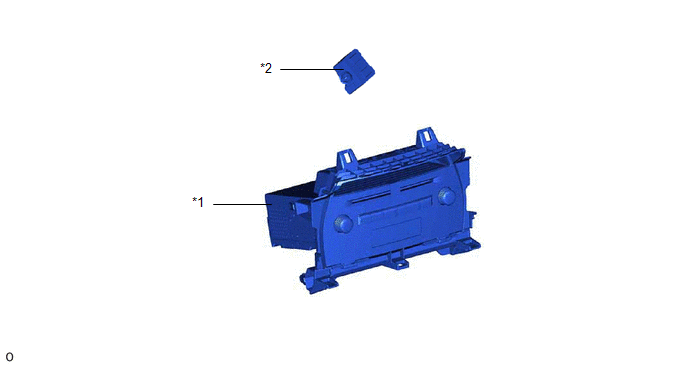
| *1 | RADIO RECEIVER ASSEMBLY | *2 | SKID CONTROL BUZZER ASSEMBLY (PRE-COLLISION SYSTEM WARNING BUZZER) |
Inspection
INSPECTION
PROCEDURE
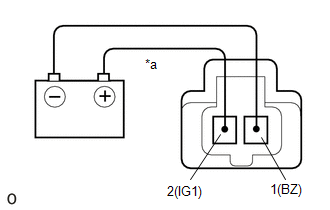
1. INSPECT SKID CONTROL BUZZER ASSEMBLY (PRE-COLLISION SYSTEM WARNING BUZZER)
| (a) Apply battery voltage and check the operation of the skid control buzzer assembly (pre-collision system warning buzzer) according to the table below. OK:
If the result is not as specified, replace the skid control buzzer assembly (pre-collision system warning buzzer). |
|
Removal
REMOVAL
PROCEDURE
1. REMOVE RADIO RECEIVER ASSEMBLY
Click here .gif)
2. REMOVE SKID CONTROL BUZZER ASSEMBLY (PRE-COLLISION SYSTEM WARNING BUZZER)
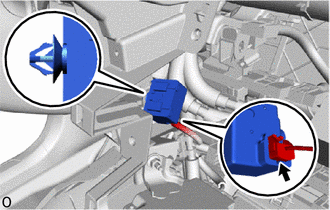
(a) Using a clip remover, disconnect the clamp.
| (b) Disconnect the connector and remove the skid control buzzer assembly (pre-collision system warning buzzer). |
|
Installation
INSTALLATION
PROCEDURE
1. INSTALL SKID CONTROL BUZZER ASSEMBLY (PRE-COLLISION SYSTEM WARNING BUZZER)
(a) Connect the connector.
(b) Install the skid control buzzer assembly (pre-collision system warning buzzer) with the clamp.
2. INSTALL RADIO RECEIVER ASSEMBLY
Click here .gif)
READ NEXT:
 Precaution
PRECAUTION FOR OPERATION OF ELECTRICAL ITEMS RESTRICTED NOTICE:
If the auxiliary battery voltage is low, the climate control seat system may not operate. When "High Power Consumption / Partial Limi
SEE MORE:
DCM Data Signal Circuit between Navigation ECU and DCM
DESCRIPTION This circuit is used to send and receive signals between the DCM (telematics transceiver) and radio receiver assembly. WIRING DIAGRAM PROCEDURE 1. CHECK HARNESS AND CONNECTOR (DCM [TELEMATICS TRANSCEIVER] - RADIO RECEIVER ASSEMBLY) (a) Disconnect the I153 radio receiver assembl
Removal
REMOVAL PROCEDURE 1. PRECAUTION NOTICE: After the power switch is turned off, there may be a waiting time before disconnecting the negative (-) auxiliary battery terminal. Click here 2. REMOVE NO. 3 DECK BOARD SUB-ASSEMBLY Click here 3. REMOVE REAR DECK FLOOR BOX Click here 4. REMOVE DECK FLOO
