
Lexus NX: Removal
REMOVAL
PROCEDURE
1. REMOVE NO. 1 ENGINE UNDER COVER ASSEMBLY
Click here .gif)
2. DRAIN COOLANT (for Inverter Coolant)
Click here
3. REMOVE NO. 2 MOTOR WATER JACKET COVER ASSEMBLY
| (a) Remove the 5 bolts. |
|
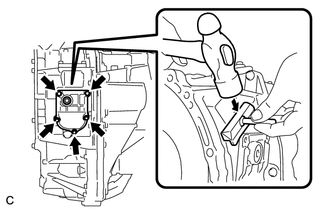
(b) Insert the blade of an oil pan seal cutter between the transaxle housing. Cut through the applied sealer and remove the No. 2 motor water jacket cover assembly.
NOTICE:
Be careful not to damage the contact surfaces of the transaxle housing where the No. 2 motor water jacket cover assembly is installed.
4. REMOVE HYBRID VEHICLE TRANSAXLE ASSEMBLY
Click here
5. REMOVE FRONT ENGINE MOUNTING BRACKET
Click here
6. REMOVE NO. 1 TRANSMISSION CONTROL CABLE BRACKET
Click here
7. REMOVE OIL COOLER TUBE CLAMP
Click here
8. REMOVE NO. 2 AUTOMATIC TRANSMISSION CASE COVER
Click here
9. REMOVE NO. 1 MOTOR WATER JACKET COVER ASSEMBLY
| (a) Remove the 8 bolts. |
|
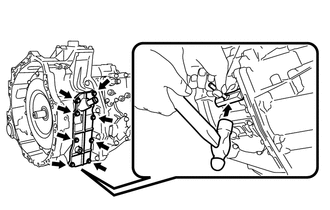
(b) Insert the blade of an oil pan seal cutter between the transaxle housing. Cut through the applied sealer and remove the No. 1 motor water jacket cover assembly.
NOTICE:
Be careful not to damage the contact surfaces of the transaxle housing where the No. 1 motor water jacket cover assembly is installed.
10. REMOVE NO. 3 MOTOR WATER JACKET COVER ASSEMBLY
| (a) Remove the 12 bolts. |
|
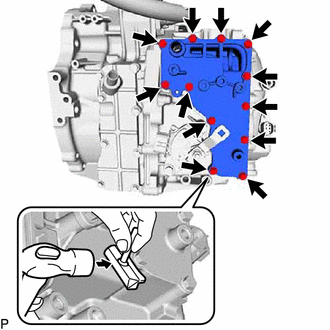
(b) Insert the blade of an oil pan seal cutter between the transaxle housing. Cut through the applied sealer and remove the No. 3 motor water jacket cover assembly.
NOTICE:
Be careful not to damage the contact surfaces of the transaxle housing where the No. 3 motor water jacket cover assembly is installed.
READ NEXT:
 Installation
INSTALLATION PROCEDURE 1. INSTALL NO. 3 MOTOR WATER JACKET COVER ASSEMBLY (a) Remove any remaining seal packing from the transaxle housing installation surface and bolt holes. NOTICE:
Clean and deg
Components
COMPONENTS ILLUSTRATION *1 NO. 1 ENGINE UNDER COVER ASSEMBLY - - ILLUSTRATION *1 INVERTER BRACKET ASSEMBLY *2 INVERTER WATER PUMP WITH MOTOR ASSEMBLY *3 NO. 5 INVERTER COO
SEE MORE:
High Voltage System Inter-Lock Circuit High (P0A0D-350,P0A0D-351)
DTC SUMMARY MALFUNCTION DESCRIPTION The hybrid vehicle control ECU detects that a safety device (interlock) is operated or that there is an open circuit in the detection circuit. (Even if an open circuit occurs while the vehicle is stopped, the system determines that the safety device was operated.)
Installation
INSTALLATION PROCEDURE 1. INSTALL BATTERY COOLING BLOWER ASSEMBLY LH CAUTION: Wear insulated gloves and use insulated tools. (a) Install the battery cooling blower assembly LH with the 3 nuts. Torque: 7.5 N·m {76 kgf·cm, 66 in·lbf} (b) Connect the wire harness clamp and connector. 2. INSTALL BAT
