
Lexus NX: Stereo Jack Adapter Assembly
Lexus NX Service Manual / Audio & Visual & Telematics / Audio / Video / Stereo Jack Adapter Assembly
Components
COMPONENTS
ILLUSTRATION
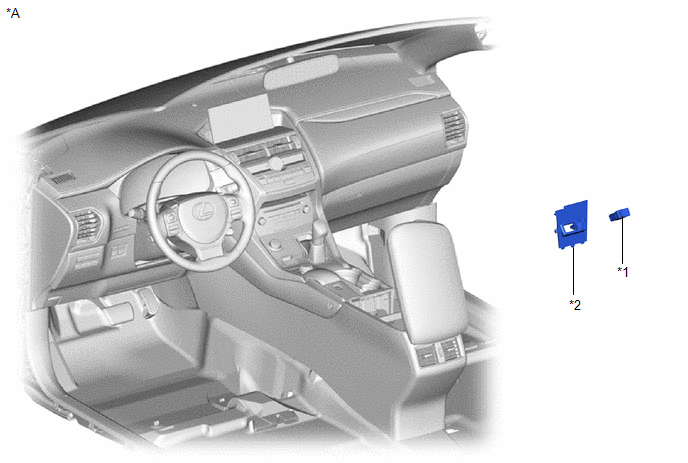
| *A | w/ Navigation System | - | - |
| *1 | NO. 1 STEREO JACK ADAPTER ASSEMBLY | *2 | NO. 3 BOX PANEL |
ILLUSTRATION
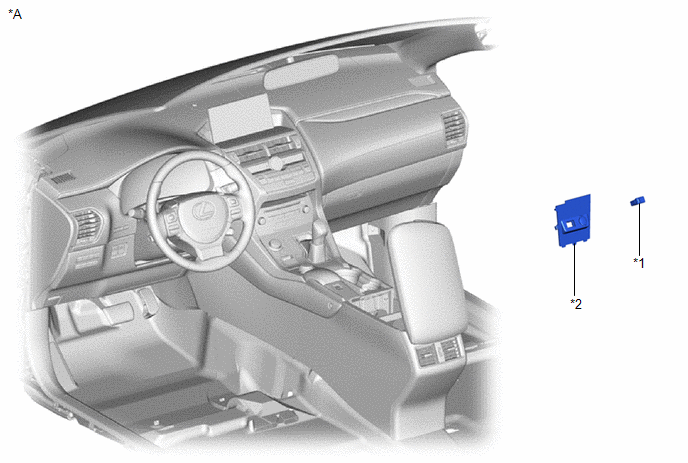
| *A | w/o Navigation System | - | - |
| *1 | NO. 1 STEREO JACK ADAPTER ASSEMBLY | *2 | NO. 3 BOX PANEL |
Installation
INSTALLATION
PROCEDURE
1. INSTALL NO. 1 STEREO JACK ADAPTER ASSEMBLY
(a) w/ Navigation System
(1) Attach the 2 claws to install the No. 1 stereo jack adapter assembly.
(b) w/o Navigation System
(1) Attach the 2 claws to install the No. 1 stereo jack adapter assembly.
2. INSTALL NO. 3 BOX PANEL
Click here .gif)
READ NEXT:
 Window Glass Antenna Wire
On-vehicle InspectionON-VEHICLE INSPECTION PROCEDURE 1. INSPECT WINDOW GLASS ANTENNA WIRE (a) Check for continuity of the antenna. HINT: Check for continuity at the center of each antenna wire as
Dcm(telematics Transceiver)
ComponentsCOMPONENTS ILLUSTRATION *1 DECK FLOOR BOX LH *2 NO. 3 DECK BOARD SUB-ASSEMBLY *3 REAR DECK FLOOR BOX *4 NEGATIVE AUXILIARY BATTERY TERMINAL N*m (kgf*cm, ft.*lbf):
SEE MORE:
Vehicle Control History
VEHICLE CONTROL HISTORY Function Overview (a) The vehicle control history is a function that records control data (record data) when triggered by specific vehicle behavior. When DTCs are not detected according to information provided by customers, by checking the vehicle control history, it is possi
Manifold Absolute Pressure / Barometric Pressure Circuit Low Input (P0107,P0108)
DESCRIPTION The manifold absolute pressure sensor detects the intake manifold pressure as a change in voltage. The ECM calculates the intake manifold pressure based on this voltage. The ECM calculates the EGR valve assembly and purge VSV opening amount according to changes in the intake manifold pr
© 2016-2026 Copyright www.lexunx.com
