
Lexus NX: System Diagram
Lexus NX Service Manual / Power Source & Network / 2ar-fxe (battery / Charging) / Charging System / System Diagram
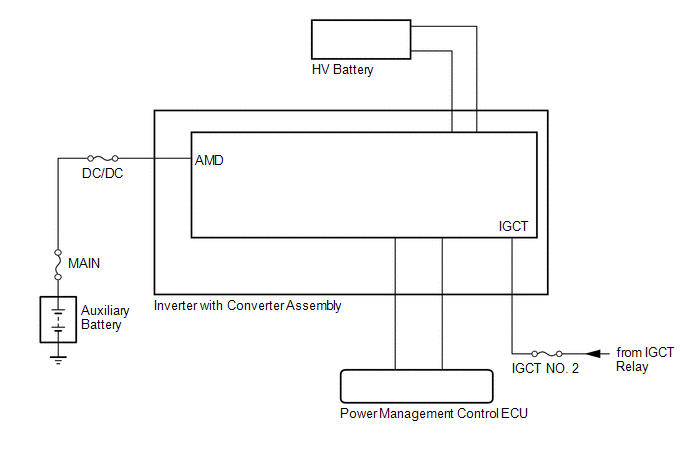
SYSTEM DIAGRAM
READ NEXT:
 How To Proceed With Troubleshooting
PROCEDURE 1. VEHICLE BROUGHT TO WORKSHOP
NEXT 2. CONFIRM PROBLEM SYMPTOMS
NEXT 3. CUSTOMER PROBLEM ANALYSIS (a) Check if the vehicle has be
On-vehicle Inspection
ON-VEHICLE INSPECTION PROCEDURE 1. CHECK AUXILIARY BATTERY (a) Check that the auxiliary battery cables are connected to the correct terminals. HINT: If they are not, connect them properly. (b) Check t
SEE MORE:
Headlight switch
The headlights can be operated
manually or automatically.
Operating the switch turns on
the lights as follows:
Type A
The side marker, parking,
tail, license plate, instrument panel
lights, and daytime running lights turn on.
The headlights and all the
lights listed abov
Wireless Transmitter Memory Function does not Operate
DESCRIPTION With the power switch on (IG) and the driver door closed, pressing the manual lock or unlock switch on the multiplex network master switch assembly while holding a seat memory switch (M1, M2 or M3 switch) will register the transmitter recognition code into the seat memory switch that was
© 2016-2026 Copyright www.lexunx.com
