
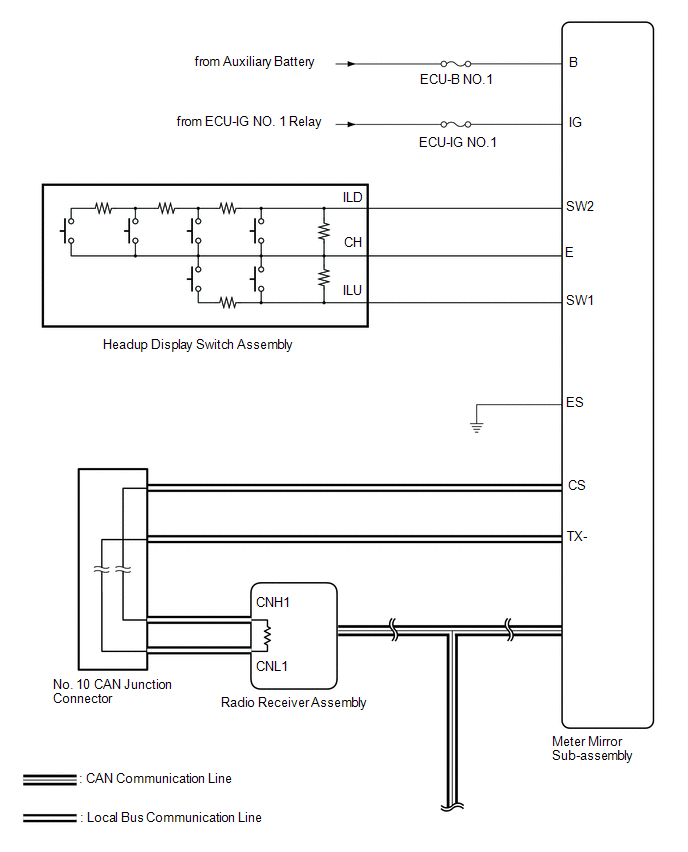
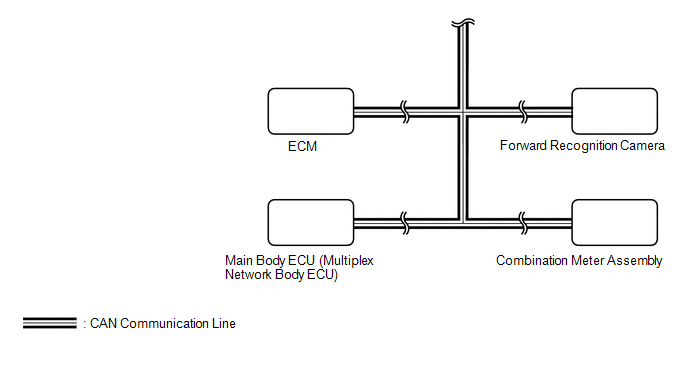
Lexus NX: System Diagram
Lexus NX Service Manual / Vehicle Interior / Meter / Gauge / Display / Headup Display System / System Diagram
SYSTEM DIAGRAM
READ NEXT:
 System Description
SYSTEM DESCRIPTION HEADUP DISPLAY SYSTEM DESCRIPTION HINT:
The meter mirror sub-assembly receives signals from the combination meter assembly via the CAN communication line. Information is displaye
Customize Parameters
CUSTOMIZE PARAMETERS CUSTOMIZE HEADUP DISPLAY SYSTEM (a) Customizing with the Techstream (1) Connect the Techstream to the DLC3. (2) Turn the power switch on (IG). (3) Turn the Techstream on. (4) Ente
How To Proceed With Troubleshooting
CAUTION / NOTICE / HINT HINT:
Use the following procedure to troubleshoot the headup display system.
*: Use the Techstream.
PROCEDURE 1. VEHICLE BROUGHT TO WORKSHOP
NEXT
SEE MORE:
System Description
SYSTEM DESCRIPTION GENERAL (a) Deceleration sensors used for the airbag system are installed on various parts of the vehicle and calculate the deceleration rate of each part during a collision. (b) Depending on the situation, the airbag ECU assembly sends a deployment signal to each airbag based on
Relay
On-vehicle InspectionON-VEHICLE INSPECTION PROCEDURE 1. INSPECT JUNCTION BLOCK *1 Main Body ECU - - *a Component without harness connected (Junction Block) *b Component without main body ECU connected (Junction Block) NOTICE: Before performing the relay inspections for the re
© 2016-2026 Copyright www.lexunx.com
