
Lexus NX: Terminals Of Ecu
TERMINALS OF ECU
HINT:
Perform the inspection from the harness side with the connectors connected.
STEERING HEATER AND VIBRATION ECU
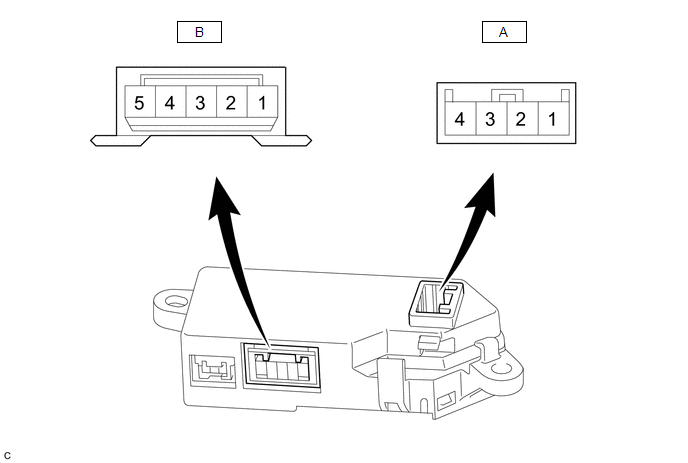
(a) Measure the voltage or resistance according to the value(s) in the table below.
| Terminal No. (Symbol) | Terminal Description | Condition | Specified Condition |
|---|---|---|---|
| A-4 (IG) - Body ground | IG power supply | Power switch on (IG) | 11 to 14 V |
| A-3 (SW) - Body ground | Steering heater switch input signal | Power switch on (IG), steering heater switch pressed and held | 11 to 14 V |
| A-2 (LED) - Body ground | LED output signal | Power switch on (IG), Heated steering wheel system operating | Below 3 V |
| A-1 (GND) - Body ground | Ground | Always | Below 1 Ω |
| B-5 (SH1) - Body ground | Heater output signal | Power switch on (IG), Heated steering wheel system operating | 11 to 14 V(*1) |
| B-3 (TH1) - Body ground | Thermistor input signal | Power switch on (IG), Heated steering wheel system operating | 2.5 to 4.8 V(*2) |
| B-2 (TH2) - Body ground | Thermistor ground | Power switch on (IG), Heated steering wheel system operating | Below 1 V |
| B-1 (SH2) - Body ground | Heater ground | Power switch on (IG), Heated steering wheel system operating | Below 1 V |
HINT:
- *1: The current to the heater turns ON/OFF depending on the temperature of the thermistor. As a result, it may take several minutes before a voltage value is output.
- *2: When ambient temperature is 0 to 40°C (32 to 104°F).
READ NEXT:
 Fail-safe Chart
FAIL-SAFE CHART MALFUNCTION DETECTION (a) Operation when malfunction is detected Content Operation Heater failure Overcurrent detection of drive element Heater output off Overheating
Steering Wheel does not Heat Up When Heated Steering Wheel Switch is Pressed
DESCRIPTION Click here WIRING DIAGRAM Click here CAUTION / NOTICE / HINT HINT:
Inspect the fuses for circuits related to this system before performing the following inspection procedure.
The
SEE MORE:
Utility
UTILITY INITIALIZE THE CONNECTION INFORMATION OF A GATEWAY FUNCTION EQUIPPED ECU (BUS MONITOR ECU) (a) Connect the Techstream to the DLC3. (b) Turn the power switch on (IG). (c) Turn the Techstream on. (d) Enter the following menus: Body Electrical / Central Gateway or Main Body / Utility. (e) Selec
Image from Camera for Panoramic View Monitor is Abnormal
DESCRIPTION The display signal from the rear television camera assembly is transmitted to the multi-display assembly via the parking assist ECU. WIRING DIAGRAM w/o Seat Memory w/ Seat Memory CAUTION / NOTICE / HINT NOTICE:
When "!" mark is displayed on the parking assist ECU after the auxiliary
