
Lexus NX: Automatic High Beam Main Switch
Inspection
INSPECTION
PROCEDURE
1. INSPECT COMBINATION SWITCH ASSEMBLY (AUTOMATIC HIGH BEAM MAIN SWITCH)
(a) Remove the combination switch assembly.
Click here .gif)
(b) Inspect the automatic high beam main switch.
| (1) Measure the resistance according to the value(s) in the table below. Standard Resistance:
If the result is not as specified, replace the combination switch assembly. |
|
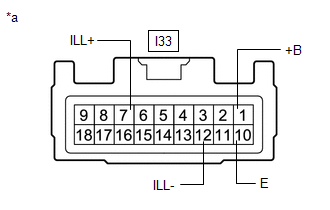
(c) Check the illumination.
(1) Apply auxiliary battery voltage to the connector and check the illumination conditions.
OK:
| Measurement Condition | Specified Condition |
|---|---|
| Auxiliary battery positive (+) → I33-7 (ILL+) Auxiliary battery negative (-) → I33-12 (ILL-) | Illuminates |
If the result is not as specified, replace the combination switch assembly.
READ NEXT:
 Precaution
PRECAUTION HANDLING PRECAUTIONS FOR FORWARD RECOGNITION CAMERA (a) The automatic high beam system uses the forward recognition camera. For precautions related to the forward recognition camera, refer
Parts Location
PARTS LOCATION ILLUSTRATION *1 FORWARD RECOGNITION CAMERA *2 BRAKE BOOSTER WITH MASTER CYLINDER ASSEMBLY (SKID CONTROL ECU) *3 HEADLIGHT ASSEMBLY LH *4 HEADLIGHT ASSEMBLY RH *5
SEE MORE:
Diagnostic Trouble Code Chart
DIAGNOSTIC TROUBLE CODE CHART Front Camera System DTC No. Detection Item Link C10001C Control Module Internal Temperature Sensor "A" Circuit Circuit Voltage Out of Range C10051C Control Module Internal Temperature Sensor "B" Circuit Circuit Voltage Out of Range C100A
All Door Entry Lock/Unlock Functions do not Operate, but Wireless Functions Operate
DESCRIPTION When the wireless operation can be used to lock and unlock the doors, communication between the door control receiver and certification ECU (smart key ECU assembly) is normal. If the entry lock and unlock functions do not operate, the entry cancel function may be set through the customiz
