
Lexus NX: Components
COMPONENTS
ILLUSTRATION
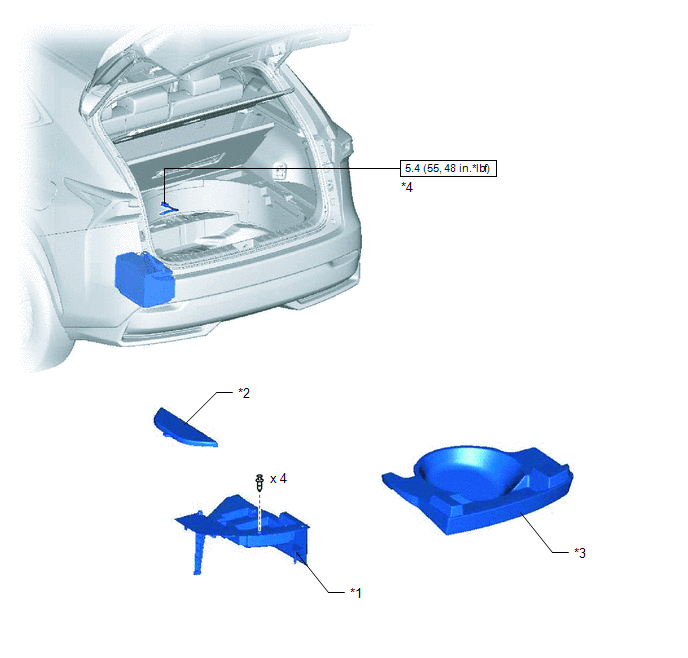
| *1 | DECK FLOOR BOX LH | *2 | NO. 3 DECK BOARD SUB-ASSEMBLY |
| *3 | REAR DECK FLOOR BOX | *4 | NEGATIVE AUXILIARY BATTERY TERMINAL |
.png) | N*m (kgf*cm, ft.*lbf): Specified torque | - | - |
ILLUSTRATION
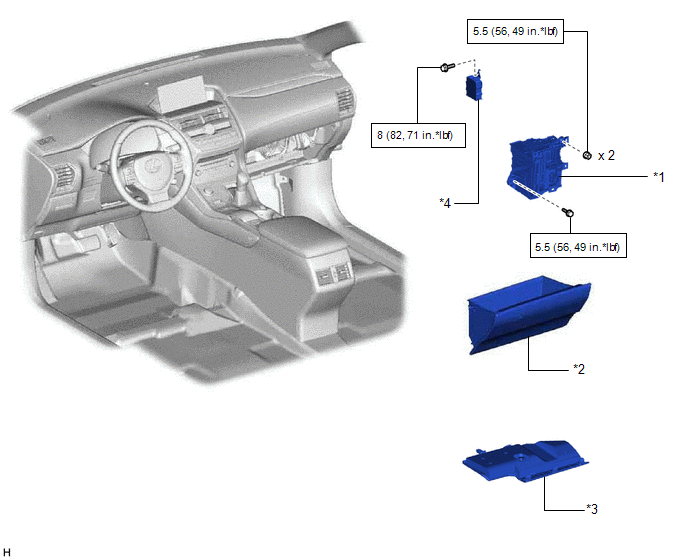
| *1 | ECU INTEGRATION BOX RH | *2 | GLOVE COMPARTMENT DOOR ASSEMBLY |
| *3 | NO. 2 INSTRUMENT PANEL UNDER COVER SUB-ASSEMBLY | *4 | VEHICLE APPROACHING SPEAKER CONTROLLER |
| | N*m (kgf*cm, ft.*lbf): Specified torque | - | - |
READ NEXT:
 Removal
REMOVAL PROCEDURE 1. PRECAUTION CAUTION: Be sure to read Precoution thoroughly before serving. Click here NOTICE: After the power switch is turned off, there may be a waiting time before disconnecti
Installation
INSTALLATION PROCEDURE 1. INSTALL VEHICLE APPROACHING SPEAKER CONTROLLER (a) Connect the connector. (b) Attach the hook to install the vehicle approaching speaker controller. NOTICE:
When installin
SEE MORE:
System Description
SYSTEM DESCRIPTION
The power steering system generates torque through the operation of the motor and the reduction gear installed on the column shaft in order to assist steering effort.
The power steering ECU assembly determines the direction and the amount of assist power in accordance with ve
Diagnostic Trouble Code Chart
DIAGNOSTIC TROUBLE CODE CHART LIN Communication System DTC No. Detection Item Link B1206 P/W Master Switch Communication Stop B1273 Sliding Roof ECU Communication Stop B2321 Driver Side Door ECU Communication Stop B2322 Front Passenger Side Door ECU Comm
© 2016-2026 Copyright www.lexunx.com
