
Lexus NX: Components
COMPONENTS
ILLUSTRATION
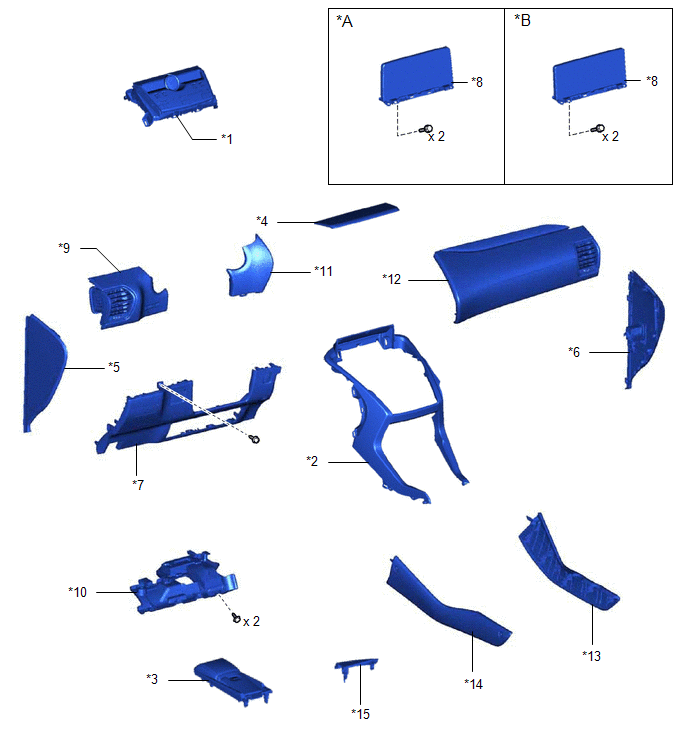
| *A | for 8 Inch Display | *B | for 10.3 Inch Display |
| *1 | AIR CONDITIONING CONTROL ASSEMBLY | *2 | CENTER INSTRUMENT CLUSTER FINISH PANEL ASSEMBLY |
| *3 | CONSOLE ARMREST ASSEMBLY | *4 | INSTRUMENT PANEL FINISH PLATE |
| *5 | INSTRUMENT SIDE PANEL LH | *6 | INSTRUMENT SIDE PANEL RH |
| *7 | LOWER NO. 1 INSTRUMENT PANEL FINISH PANEL | *8 | MULTI-DISPLAY ASSEMBLY WITH BRACKET |
| *9 | NO. 1 INSTRUMENT PANEL SAFETY PAD SUB-ASSEMBLY | *10 | NO. 1 INSTRUMENT PANEL UNDER COVER SUB-ASSEMBLY |
| *11 | NO. 1 SWITCH HOLE BASE | *12 | NO. 2 INSTRUMENT PANEL SAFETY PAD SUB-ASSEMBLY |
| *13 | UPPER NO. 1 CONSOLE PANEL GARNISH | *14 | UPPER NO. 2 CONSOLE PANEL GARNISH |
| *15 | UPPER REAR CONSOLE PANEL | - | - |
ILLUSTRATION
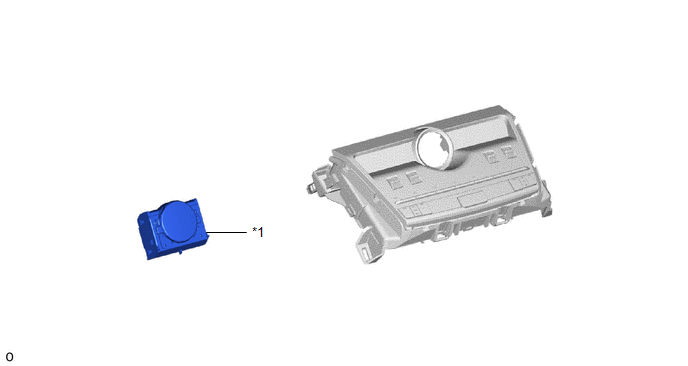
| *1 | CLOCK ASSEMBLY | - | - |
READ NEXT:
 Removal
REMOVAL PROCEDURE 1. REMOVE CONSOLE ARMREST ASSEMBLY Click here 2. REMOVE UPPER REAR CONSOLE PANEL Click here 3. REMOVE UPPER NO. 2 CONSOLE PANEL GARNISH Click here 4. REMOVE UPPER NO. 1 CONS
Inspection
INSPECTION PROCEDURE 1. INSPECT CLOCK ASSEMBLY (a) Check the illumination. Apply auxiliary battery voltage to the connector and check the illumination condition. OK: Measurement Condition Spe
Installation
INSTALLATION PROCEDURE 1. INSTALL CLOCK ASSEMBLY (a) Attach the 2 claws to install the clock assembly. 2. INSTALL AIR CONDITIONING CONTROL ASSEMBLY (a) Connect the connectors.
SEE MORE:
Rear Door Courtesy Switch Circuit
DESCRIPTION The fold seat control ECU receives the switch operation signal, driving condition signal and rear door open/close signal. Then the fold seat control ECU actives the rear seat according to these signals. WIRING DIAGRAM PROCEDURE 1. INSPECT REAR DOOR COURTESY LIGHT SWITCH ASSEMBLY
Parts Location
PARTS LOCATION ILLUSTRATION *1 NO. 2 ENGINE ROOM RELAY BLOCK - DCM FUSE (w/ Manual [SOS] Switch) - ECU-B NO.5 FUSE - ECU-B NO.1 FUSE *2 NO. 1 ENGINE ROOM RELAY BLOCK - AMP FUSE - RADIO FUSE - METER NO.1 FUSE *3 TELEPHONE MICROPHONE ASSEMBLY *4 ROOF HEADLINING HOLDER COVER *5
© 2016-2026 Copyright www.lexunx.com
