
Lexus NX: Disassembly
DISASSEMBLY
CAUTION / NOTICE / HINT
NOTICE:
- When using a vise, place aluminum plates between the part and vise.
- When using a vise, do not overtighten it.
PROCEDURE
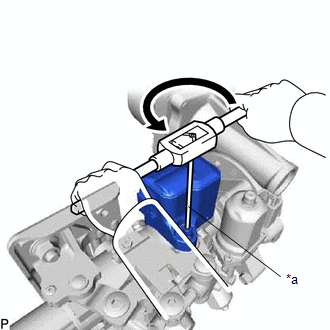
1. REMOVE STEERING LOCK ACTUATOR ASSEMBLY
(a) Secure the electric power steering column sub-assembly in a vise.
(b) Using a center punch, mark the center of the 2 tapered-head bolts.
(c) Using a 3 to 4 mm (0.119 to 0.157 in.) drill, drill a hole in the 2 bolts.
| (d) Using a screw extractor, remove the 2 bolts and steering lock actuator assembly from the electric power steering column sub-assembly. |
|
2. REMOVE POWER STEERING ECU ASSEMBLY
Click here .gif)
3. REMOVE MULTIPLEX TILT AND TELESCOPIC ECU
Click here
READ NEXT:
 Inspection
INSPECTION CAUTION / NOTICE / HINT NOTICE:
When using a vise, place aluminum plates between the part and vise.
When using a vise, do not overtighten it.
PROCEDURE 1. INSPECT ELECTRIC POWER STE
Installation
INSTALLATION CAUTION / NOTICE / HINT NOTICE:
Do not replace the spiral with sensor cable sub-assembly with the battery connected and the power switch on (IG).
Do not rotate the spiral with sensor
Steering Heater Switch
InspectionINSPECTION PROCEDURE 1. REMOVE NO. 2 COMBINATION SWITCH ASSEMBLY Click here 2. INSPECT NO. 2 COMBINATION SWITCH ASSEMBLY (a) Measure the voltage according to the value (s) in the table
SEE MORE:
Removal
REMOVAL PROCEDURE 1. PLACE FRONT WHEELS FACING STRAIGHT AHEAD 2. SECURE STEERING WHEEL (a) Secure the steering wheel assembly with the seat belt in order to prevent rotation. HINT: This operation is useful to prevent damage to the spiral cable. 3. REMOVE COLUMN HOLE COVER SILENCER SHE
Engine Coolant Temperature Circuit (P0115,P0117,P0118)
DESCRIPTION A thermistor, whose resistance value varies according to the engine coolant temperature, is built into the engine coolant temperature sensor. The structure of the sensor and its connection to the ECM are the same as those of the intake air temperature sensor. HINT: When DTC P0115, P0117
© 2016-2026 Copyright www.lexunx.com
