
Lexus NX: Disassembly
DISASSEMBLY
CAUTION / NOTICE / HINT
HINT:
- Use the same procedure for the RH and LH sides.
- The procedure listed below is for the LH side.
PROCEDURE
1. REMOVE NO. 3 MOULDING TAPE
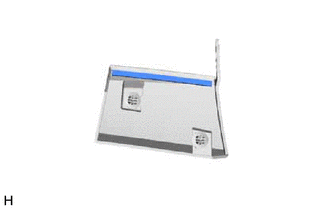
(a) Remove the No. 3 moulding tape.
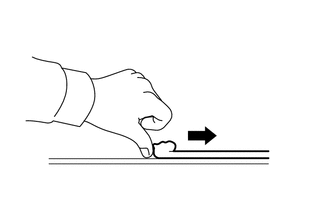
HINT:
Do not pull on the No. 3 moulding tape. Instead, roll the tape up with your finger to remove it.
(b) Using non-residue solvent and a cloth, wipe off any No. 3 moulding tape (double-sided-tape) remaining on the side mudguard sub-assembly LH.
HINT:
If any No. 3 moulding tape (double-sided-tape) remains in the groove of the side mudguard LH, use a thin-bladed screwdriver to remove it.
READ NEXT:
 Reassembly
REASSEMBLY CAUTION / NOTICE / HINT HINT:
Use the same procedure for the RH and LH sides.
The procedure listed below is for the LH side.
PROCEDURE 1. INSTALL NO. 3 MOULDING TAPE (a) Clean the N
Installation
INSTALLATION CAUTION / NOTICE / HINT HINT:
Use the same procedure for the RH and LH sides.
The procedure listed below is for the LH side.
PROCEDURE 1. INSTALL SIDE MUDGUARD SUB-ASSEMBLY LH HIN
SEE MORE:
Utility
UTILITY NOTICE: If the forward recognition camera has been replaced due to a malfunction in the road sign assist system, be sure to perform forward recognition camera adjustment. Otherwise all systems that use the forward recognition camera may be affected. HINT: Forward recognition camera adjustmen
Components
COMPONENTS ILLUSTRATION *1 DECK FLOOR BOX LH *2 NO. 3 DECK BOARD SUB-ASSEMBLY *3 REAR DECK FLOOR BOX *4 NEGATIVE AUXILIARY BATTERY TERMINAL N*m (kgf*cm, ft.*lbf): Specified torque - - ILLUSTRATION *1 NO. 1 BLACK OUT TAPE LH *2 NO. 2 BLACK OUT TAPE LH *
© 2016-2026 Copyright www.lexunx.com
