
Lexus NX: Inspection
INSPECTION
PROCEDURE
1. INSPECT BACK DOOR OPENER SWITCH ASSEMBLY
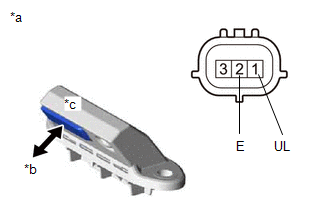
(a) Check the operation of the opener switch.
| (1) Measure the resistance according to the value(s) in the table below. Standard Resistance:
If the result is not as specified, replace the back door opener switch assembly. |
|
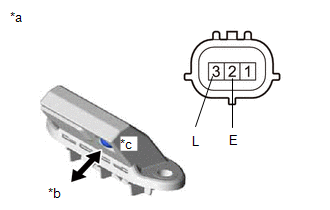
| (b) Check the operation of the lock switch. (1) Measure the resistance according to the value(s) in the table below. Standard Resistance:
If the result is not as specified, replace the back door opener switch assembly. |
|
READ NEXT:
 Installation
INSTALLATION PROCEDURE 1. INSTALL BACK DOOR OPENER SWITCH ASSEMBLY (a) Connect the connector. (b) Install the back door opener switch assembly. 2. INSTALL BACK DOOR OUTSIDE GARNISH SUB-ASSEMBLY Click
Back Door Support
ComponentsCOMPONENTS ILLUSTRATION *1 BACK DOOR LOWER DAMPER STAY BRACKET LH *2 BACK DOOR STAY ASSEMBLY LH *3 BACK DOOR UPPER DAMPER STAY BRACKET LH - - N*m (kgf*cm, ft.*lbf
Back Door Weatherstrip
ComponentsCOMPONENTS ILLUSTRATION *1 BACK DOOR WEATHERSTRIP - - ● Non-reusable part - - RemovalREMOVAL PROCEDURE 1. REMOVE BACK DOOR WEATHERSTRIP (a) Remove the back door
SEE MORE:
Sensor Frozen Indication (Dirty or Frozen)
DESCRIPTION When the ultrasonic sensor is dirty or frozen, "Parking Assist Unavailable Clean Parking Assist Sensor" is displayed on the multi-information display in the combination meter assembly. PROCEDURE 1. CHECK FOR DTC (a) Clear the DTCs. Click here Body Electrical > Advanced Park
Diagnostic Trouble Code Chart
DIAGNOSTIC TROUBLE CODE CHART Adaptive Variable Suspension System DTC No. Detection Item Warning Indicate Link C1715 Front Acceleration Sensor RH Malfunction Does not come on C1716 Front Acceleration Sensor LH Malfunction Does not come on C1717 Rear Accelerat
