
Lexus NX: Inspection
INSPECTION
PROCEDURE
1. INSPECT AUTOMATIC LIGHT CONTROL SENSOR
| (a) Disconnect the automatic light control sensor connector. |
|
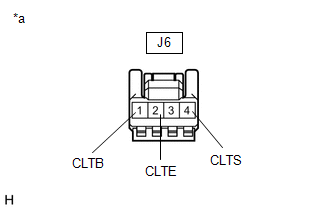
(b) Measure the voltage and resistance according to the value(s) in the table below.
Standard Voltage:
| Tester Connection | Condition | Specified Condition |
|---|---|---|
| J6-1 (CLTB) - J6-2 (CLTE) | Power switch off | Below 1 V |
| Power switch on (IG) | 11 to 14 V |
Standard Resistance:
| Tester Connection | Condition | Specified Condition |
|---|---|---|
| J6-2 (CLTE) - Body ground | Always | Below 1 Ω |
If the result is not as specified, there may be a malfunction on the wire harness side.
| (c) Reconnect the automatic light control sensor connector. |
|
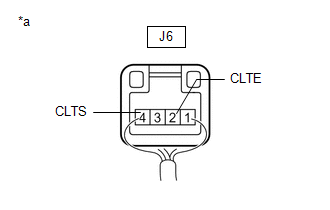
(d) Connect an oscilloscope to the automatic light control sensor connector.
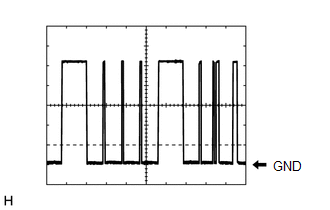
| (e) Check the waveform. OK:
HINT: The communication waveform changes according to the surrounding brightness. If the result is not as specified, the automatic light control sensor may be malfunctioning. |
|
READ NEXT:
 Installation
INSTALLATION PROCEDURE 1. INSTALL AUTOMATIC LIGHT CONTROL SENSOR (a) Attach the 2 claws to install the automatic light control sensor. 2. INSTALL NO. 1 SPEAKER OPENING COVER ASSEMBLY Click here 3.
Components
COMPONENTS ILLUSTRATION *1 CLEARANCE LIGHT ASSEMBLY LH *2 FRONT BUMPER ASSEMBLY *3 FRONT TURN SIGNAL LIGHT BULB - -
SEE MORE:
Disassembly
DISASSEMBLY PROCEDURE 1. REMOVE BACK DOOR UPPER OUTSIDE GARNISH LH (a) Remove the screw and back door upper outside garnish LH. 2. REMOVE BACK DOOR UPPER OUTSIDE GARNISH RH HINT: Use the same procedure described for the LH side. 3. REMOVE BACK DOOR NO. 1 GARNISH RETAINER (a) Remove
Driving the vehicle
The specified procedures should be
observed to ensure safe driving:
Driving procedure
■ Starting the hybrid system
■ Driving
1. With the brake pedal depressed,
shift the shift lever to D.
2. Release the parking brake.
If the parking brake is in automatic mode,
the parking brake is rele
