
Lexus NX: Inspection
INSPECTION
PROCEDURE
1. INSPECT HEADUP DISPLAY SWITCH ASSEMBLY
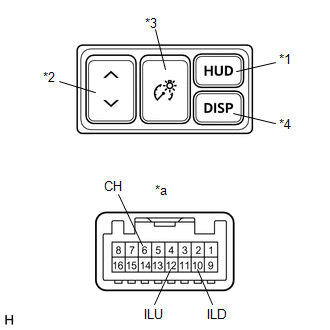
| *1 | HUD Switch |
| *2 | TILT Switch |
| *3 | RHEOSTAT Switch |
| *4 | DISP Switch |
| *a | Component without harness connected (Headup Display Switch Assembly) |
(a) Check the resistance.
Measure the resistance according to the value(s) in the table below.
Standard Resistance:
| Tester Connection | Switch Condition | Specified Condition |
|---|---|---|
| 12 (ILU) - 6 (CH) | HUD switch off (Not pushed) | 100 kΩ |
| 10 (ILD) - 6 (CH) | 100 kΩ | |
| 12 (ILU) - 6 (CH) | HUD switch on (Pushed) | Below 1 Ω |
| 10 (ILD) - 6 (CH) | 100 kΩ | |
| 12 (ILU) - 6 (CH) | TILT switch (UP) on (Pushed) | 100 kΩ |
| 10 (ILD) - 6 (CH) | 3210 Ω | |
| 12 (ILU) - 6 (CH) | TILT switch off (Not pushed) | 100 kΩ |
| 10 (ILD) - 6 (CH) | 100 kΩ | |
| 12 (ILU) - 6 (CH) | TILT switch (DOWN) on (Pushed) | 100 kΩ |
| 10 (ILD) - 6 (CH) | 1010 Ω | |
| 12 (ILU) - 6 (CH) | RHEOSTAT switch (ILL UP) on (Pushed) | 100 kΩ |
| 10 (ILD) - 6 (CH) | 330 Ω | |
| 12 (ILU) - 6 (CH) | RHEOSTAT switch off (Not pushed) | 100 kΩ |
| 10 (ILD) - 6 (CH) | 100 kΩ | |
| 12 (ILU) - 6 (CH) | RHEOSTAT switch (ILL DOWN) on (Pushed) | 100 kΩ |
| 10 (ILD) - 6 (CH) | Below 1 Ω | |
| 12 (ILU) - 6 (CH) | DISP switch off (Not pushed) | 100 kΩ |
| 10 (ILD) - 6 (CH) | 100 kΩ | |
| 12 (ILU) - 6 (CH) | DISP switch on (Pushed) | 330 Ω |
| 10 (ILD) - 6 (CH) | 100 kΩ |
If the result is not as specified, replace the headup display switch assembly.
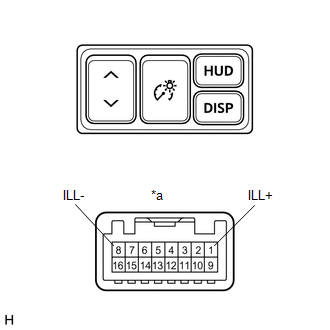
| (b) Check the illumination. Apply battery voltage to the connector and check the illumination condition. OK:
If the result is not as specified, replace the headup display switch assembly. |
|
READ NEXT:
 Installation
INSTALLATION PROCEDURE 1. INSTALL HEADUP DISPLAY SWITCH ASSEMBLY (a) Attach the 4 claws to install the headup display switch assembly. 2. INSTALL NO. 1 SWITCH HOLE BASE Click here 3
Parts Location
PARTS LOCATION ILLUSTRATION *1 HEADUP DISPLAY SWITCH ASSEMBLY *2 METER MIRROR SUB-ASSEMBLY *3 FORWARD RECOGNITION CAMERA *4 NO. 2 ENGINE ROOM RELAY BLOCK - ECU-B NO.1 FUSE *5
SEE MORE:
Customize Parameters
CUSTOMIZE PARAMETERS CUSTOMIZE SEAT BELT WARNING SYSTEM HINT: The following items can be customized. NOTICE:
When the customer requests a change in a function, first make sure that the function can be customized.
Record the current settings before customizing.
(a) Customizing with the Techst
Crankshaft Position - Camshaft Position Correlation (Bank 1 Sensor A) (P0016)
DESCRIPTION In the VVT (Variable Valve Timing) system, the appropriate intake valve open and close timing is controlled by the ECM. The ECM performs intake valve control by performing the following: 1) controlling the intake camshaft and camshaft timing oil control valve assembly, and operating the
