
Lexus NX: Installation
Lexus NX Service Manual / Vehicle Interior / Meter / Gauge / Display / Headup Display Switch / Installation
INSTALLATION
PROCEDURE
1. INSTALL HEADUP DISPLAY SWITCH ASSEMBLY
| (a) Attach the 4 claws to install the headup display switch assembly. |
|
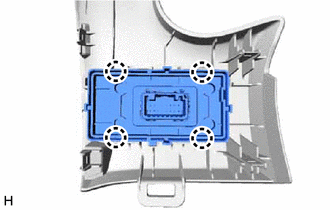
2. INSTALL NO. 1 SWITCH HOLE BASE
Click here .gif)
3. INSTALL LOWER NO. 1 INSTRUMENT PANEL FINISH PANEL
Click here
4. INSTALL NO. 1 INSTRUMENT PANEL UNDER COVER SUB-ASSEMBLY
Click here
5. INSTALL NO. 1 INSTRUMENT PANEL SAFETY PAD SUB-ASSEMBLY
Click here
6. INSTALL INSTRUMENT SIDE PANEL LH
Click here
7. INSTALL UPPER NO. 2 CONSOLE PANEL GARNISH
Click here
8. INSTALL CONSOLE ARMREST ASSEMBLY
Click here
READ NEXT:
 Parts Location
PARTS LOCATION ILLUSTRATION *1 HEADUP DISPLAY SWITCH ASSEMBLY *2 METER MIRROR SUB-ASSEMBLY *3 FORWARD RECOGNITION CAMERA *4 NO. 2 ENGINE ROOM RELAY BLOCK - ECU-B NO.1 FUSE *5
System Diagram
SYSTEM DIAGRAM
SEE MORE:
Dtc Check / Clear
DTC CHECK / CLEAR NOTICE:
The steering lock ECU (steering lock actuator assembly) does not store history DTCs. If any DTCs are output, confirm and record them as soon as possible. Do not turn the power switch off or clear the DTCs until the DTCs are confirmed and recorded.
DTCs may have been st
Precaution
PRECAUTION TROUBLESHOOTING PRECAUTIONS (a) When there is a malfunction with terminal contact points or a problem with the installation of a part, reconnecting the connectors or removal/installation of the suspected parts may return the system to the normal condition either completely or temporarily.
© 2016-2026 Copyright www.lexunx.com
