
Lexus NX: Parts Location
Lexus NX Service Manual / Vehicle Interior / Meter / Gauge / Display / Headup Display System / Parts Location
PARTS LOCATION
ILLUSTRATION
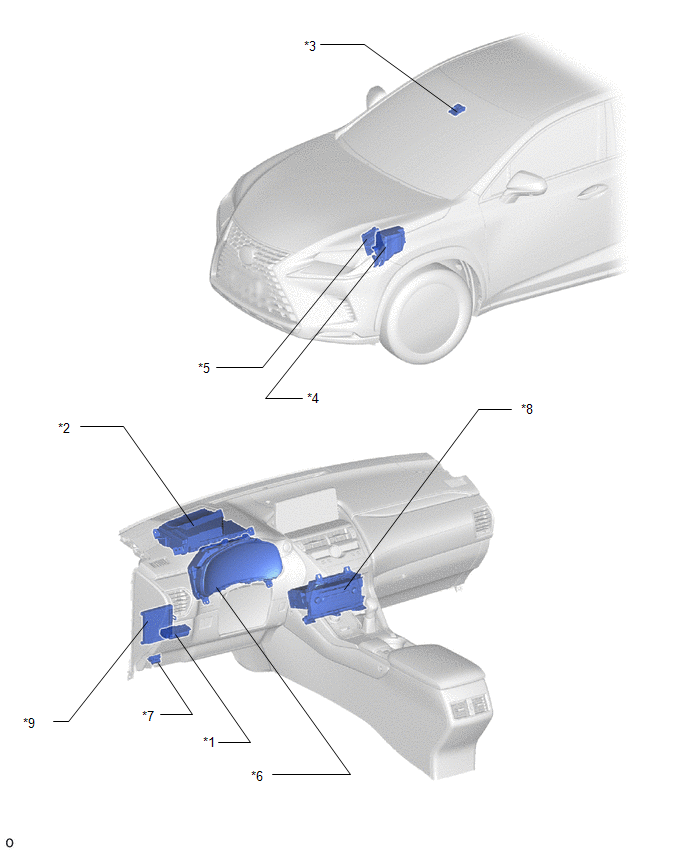
| *1 | HEADUP DISPLAY SWITCH ASSEMBLY | *2 | METER MIRROR SUB-ASSEMBLY |
| *3 | FORWARD RECOGNITION CAMERA | *4 | NO. 2 ENGINE ROOM RELAY BLOCK - ECU-B NO.1 FUSE |
| *5 | ECM | *6 | COMBINATION METER ASSEMBLY |
| *7 | DLC3 | *8 | RADIO RECEIVER ASSEMBLY |
| *9 | MAIN BODY ECU(MULTIPLEX NETWORK BODY ECU) | - | - |
READ NEXT:
 System Diagram
SYSTEM DIAGRAM
System Description
SYSTEM DESCRIPTION HEADUP DISPLAY SYSTEM DESCRIPTION HINT:
The meter mirror sub-assembly receives signals from the combination meter assembly via the CAN communication line. Information is displaye
Customize Parameters
CUSTOMIZE PARAMETERS CUSTOMIZE HEADUP DISPLAY SYSTEM (a) Customizing with the Techstream (1) Connect the Techstream to the DLC3. (2) Turn the power switch on (IG). (3) Turn the Techstream on. (4) Ente
SEE MORE:
Lost Communication with "Door Control Module A" (U0199)
DESCRIPTION DTC No. Detection Item DTC Detection Condition Trouble Area DTC Output from U0199 Lost Communication with "Door Control Module A" There is no communication from the outer mirror control ECU assembly LH.
Power source circuit of outer mirror control ECU assembly LH
PIG Power Supply Voltage (C1552,C1554)
DESCRIPTION When a problem occurs in the power steering system, the power source relay circuit is shut off to stop the power assist. DTC No. Detection Item DTC Detection Condition Trouble Area Warning Indicate Return-to-normal Condition C1552 PIG Power Supply Voltage PIG power s
© 2016-2026 Copyright www.lexunx.com
