
Lexus NX: Installation
INSTALLATION
PROCEDURE
1. INSTALL HV WATER PUMP BRACKET SUB-ASSEMBLY
| (a) Temporarily install the HV water pump bracket sub-assembly to the inverter bracket with bolt A. |
|
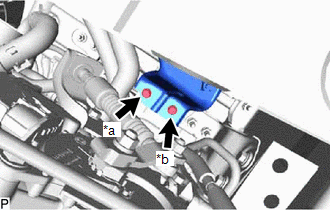
(b) Install bolt B.
Torque:
10 N·m {102 kgf·cm, 7 ft·lbf}
(c) Tighten bolt A.
Torque:
10 N·m {102 kgf·cm, 7 ft·lbf}
2. INSTALL WATER PUMP WITH MOTOR
| (a) Connect the No. 2 inverter cooling hose and No. 3 inverter cooling hose to the water pump with motor, and slide the clamp to secure it. NOTICE:
|
|
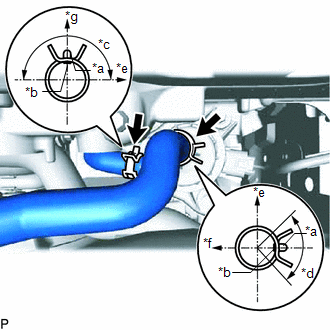
(b) Install the water pump with motor with the 3 bolts.
Torque:
6.1 N·m {62 kgf·cm, 54 in·lbf}
HINT:
First, temporarily install the 2 bolts, install the 3rd bolt with the specified torque, and then tighten the 2 bolts.
(c) Connect the water pump with motor connector.
3. CONNECT NO. 2 INVERTER COOLING HOSE ASSEMBLY
Click here .gif)
4. INSTALL UPPER RADIATOR SUPPORT SUB-ASSEMBLY
Click here
5. ADD COOLANT (for Inverter Coolant)
Click here
6. INSPECT FOR COOLANT LEAK (for Inverter Coolant)
Click here
7. INSTALL NO. 1 ENGINE UNDER COVER ASSEMBLY
Click here
READ NEXT:
 Components
COMPONENTS ILLUSTRATION *1 INVERTER RESERVOIR ASSEMBLY *2 NO. 1 ENGINE COVER SUB-ASSEMBLY *3 WIRE HARNESS - - N*m (kgf*cm, ft.*lbf): Specified torque - - ILLUSTRATION
SEE MORE:
Components
COMPONENTS ILLUSTRATION *1 DECK FLOOR BOX LH *2 NO. 3 DECK BOARD SUB-ASSEMBLY *3 REAR DECK FLOOR BOX *4 AUXILIARY BATTERY NEGATIVE TERMINAL N*m (kgf*cm, ft.*lbf): Specified torque - - ILLUSTRATION *1 COWL SIDE TRIM BOARD LH *2 DOOR SCUFF PLATE ASSEMBLY LH
ECU Malfunction (C1611)
DESCRIPTION If the clearance warning ECU assembly detects an internal malfunction during self-diagnosis, DTC C1611 is stored. DTC No. Detection Item DTC Detection Condition Trouble Area C1611 ECU Malfunction
Sub-CPU abnormal signal
Mirror check abnormal
Clearance warning E
