
Lexus NX: Main Switch Circuit
DESCRIPTION
The headup display switch assembly and meter mirror sub-assembly are connected via direct line. The meter mirror sub-assembly can be turned off and on by operating the headup display switchassembly.
WIRING DIAGRAM
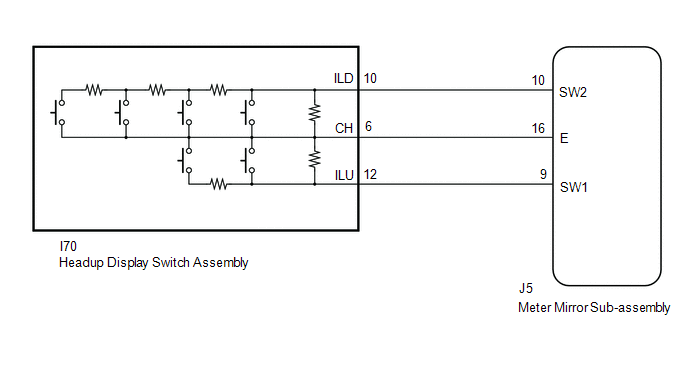
PROCEDURE
| 1. | READ VALUE USING TECHSTREAM (MAIN SWITCH) |
(a) Connect the Techstream to the DLC3.
(b) Turn the power switch on (IG).
(c) Turn the Techstream on.
(d) Enter the following menus: Body Electrical / Head Up Display / Data List.
(e) Read the Data List according to the display on the Techstream.
Body Electrical > Head Up Display > Data List| Tester Display | Measurement Item | Range | Normal Condition | Diagnostic Note |
|---|---|---|---|---|
| Main Switch | Main switch | OFF or ON | OFF: Switch released ON: Switch pushed | - |
| Brightness Up Switch | Brightness up switch | OFF or ON | OFF: Switch released ON: Switch pushed | - |
| Brightness Down Switch | Brightness down switch | OFF or ON | OFF: Switch released ON: Switch pushed | - |
| Projection Position Up Switch | Projection position up switch | OFF or ON | OFF: Switch released ON: Switch pushed | - |
| Projection Position Down Switch | Projection position down switch | OFF or ON | OFF: Switch released ON: Switch pushed | - |
| Display Change Switch | Display change switch | OFF or ON | OFF: Switch released ON: Switch pushed | - |
OK:
Headup display switch assembly condition displayed on the Techstream changes with the actual switch operation.
Body Electrical > Head Up Display > Data List| Tester Display |
|---|
| Main Switch |
| Brightness Up Switch |
| Brightness Down Switch |
| Projection Position Up Switch |
| Projection Position Down Switch |
| Display Change Switch |
| OK | .gif) | REPLACE METER MIRROR SUB-ASSEMBLY |
|
.gif)
| 2. | INSPECT HEADUP DISPLAY SWITCH ASSEMBLY |
(a) Remove the headup display switch assembly.
Click here .gif)
(b) Inspect the headup display switch assembly.
Click here
| NG | | REPLACE HEADUP DISPLAY SWITCH ASSEMBLY |
|
| 3. | CHECK HARNESS AND CONNECTOR (METER MIRROR SUB-ASSEMBLY - HEADUP DISPLAY SWITCH ASSEMBLY) |
(a) Disconnect the J5 meter mirror sub-assembly connector.
(b) Disconnect the I70 headup display switch assembly) connector.
(c) Measure the resistance according to the value(s) in the table below.
Standard Resistance:
| Tester Connection | Condition | Specified Condition |
|---|---|---|
| J5-9(SW1) - I70-12(ILU) | Always | Below 1 Ω |
| J5-10(SW2) - I70-10(ILD) | Always | Below 1 Ω |
| J5-16(E) - I70-6(CH) | Always | Below 1 Ω |
| J5-9(SW1) or I70-12(ILU) - Body ground | Always | 10 kΩ or higher |
| J5-10(SW2) or I70-10(ILD) - Body ground | Always | 10 kΩ or higher |
| J5-16(E) or I70-6(CH) - Body ground | Always | 10 kΩ or higher |
| OK | | REPLACE METER MIRROR SUB-ASSEMBLY |
| NG | | REPAIR OR REPLACE HARNESS OR CONNECTOR |
READ NEXT:
 Components
COMPONENTS ILLUSTRATION *1 INSTRUMENT SIDE PANEL LH *2 NO. 1 INSTRUMENT PANEL SAFETY PAD SUB-ASSEMBLY *3 TRIP SWITCH (LIGHT CONTROL RHEOSTAT) - -
Removal
REMOVAL PROCEDURE 1. REMOVE INSTRUMENT SIDE PANEL LH Click here 2. REMOVE NO. 1 INSTRUMENT PANEL SAFETY PAD SUB-ASSEMBLY Click here 3. REMOVE TRIP SWITCH (LIGHT CONTROL RHEOSTAT) (a) Using
SEE MORE:
Removal
REMOVAL PROCEDURE 1. REMOVE FRONT WHEEL Click here 2. REMOVE NO. 1 ENGINE UNDER COVER ASSEMBLY Click here 3. REMOVE REAR ENGINE UNDER COVER LH Click here 4. REMOVE REAR ENGINE UNDER COVER RH Click here 5. DRAIN HYBRID TRANSAXLE FLUID Click here 6. REMOVE FRONT AXLE SHAFT NUT LH Click here
Dtc Check / Clear
DTC CHECK / CLEAR CHECK FOR DTC NOTICE: When using the Techstream with the power switch off, connect the Techstream to the DLC3 and turn a courtesy light switch on and off at intervals of 1.5 seconds or less until communication between the Techstream and the vehicle begins. Then select the vehicle t
