
Lexus NX: Network Gateway Ecu
Components
COMPONENTS
ILLUSTRATION
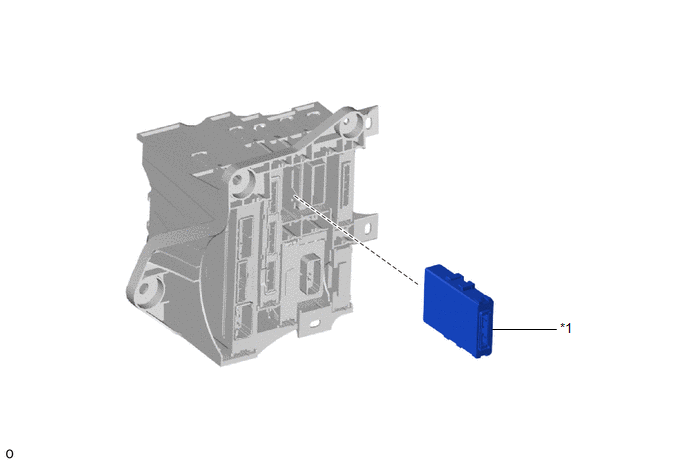
| *1 | NETWORK GATEWAY ECU | - | - |
Removal
REMOVAL
PROCEDURE
1. REMOVE ECU INTEGRATION BOX RH
Click here .gif)
2. REMOVE NETWORK GATEWAY ECU
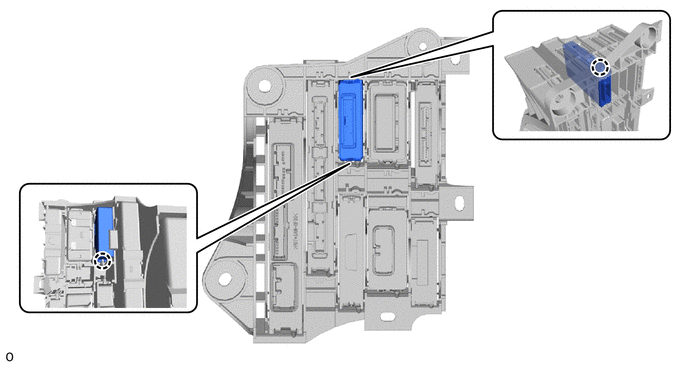
(a) Detach the 2 claws and remove the network gateway ECU.
Installation
INSTALLATION
PROCEDURE
1. INSTALL NETWORK GATEWAY ECU
(a) Attach the 2 claws to install the network gateway ECU.
2. INSTALL ECU INTEGRATION BOX RH
Click here .gif)
READ NEXT:
 Components
COMPONENTS ILLUSTRATION *1 DECK FLOOR BOX LH *2 NO. 3 DECK BOARD SUB-ASSEMBLY *3 REAR DECK FLOOR BOX *4 AUXILIARY BATTERY NEGATIVE TERMINAL N*m (kgf*cm, ft.*lbf): Specified
SEE MORE:
Auto Down Operation does not Fully Open Power Window (Catch Protection Function is Activated)
DESCRIPTION If a door glass or a power window regulator motor assembly does not operate smoothly, the catch protection function may be triggered automatically, resulting in the auto down operation being unable to fully open the window. CAUTION / NOTICE / HINT NOTICE:
If a power window regulator m
System Description
SYSTEM DESCRIPTION AUTOMATIC HIGH BEAM SYSTEM (a) General The automatic high beam system enhances the illumination of the area in front of the vehicle to improve visibility for the driver. It works by detecting light from the front of the vehicle, using the forward recognition camera, and turns the
© 2016-2026 Copyright www.lexunx.com
