
Lexus NX: Power Switch
Components
COMPONENTS
ILLUSTRATION
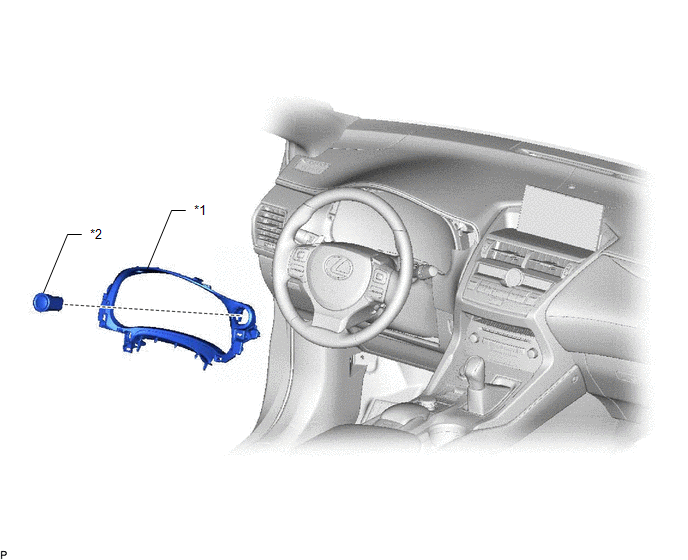
| *1 | INSTRUMENT CLUSTER FINISH PANEL SUB-ASSEMBLY | *2 | POWER SWITCH |
Removal
REMOVAL
PROCEDURE
1. REMOVE INSTRUMENT CLUSTER FINISH PANEL SUB-ASSEMBLY
Click here .gif)
2. REMOVE POWER SWITCH
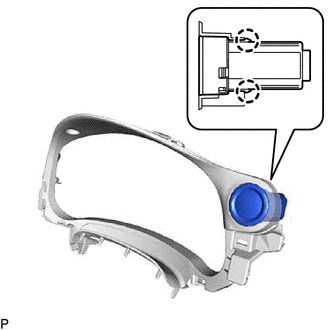
| (a) Detach the 2 claws and remove the power switch. |
|
Inspection
INSPECTION
PROCEDURE
1. INSPECT POWER SWITCH
| (a) Measure the resistance according to the value(s) in the table below. Standard Resistance:
If the result is not as specified, replace the power switch. |
|
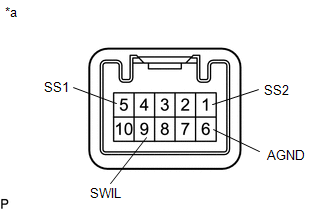
(b) Apply battery voltage between the terminals of the power switch, and check the illumination condition of the power switch.
OK:
| Measurement Condition | Specified Condition |
|---|---|
| Battery positive (+) → Terminal 9 (SWIL) Battery negative (-) → Terminal 6 (AGND) | Illuminates |
NOTICE:
- If the positive (+) lead and the negative (-) lead are incorrectly connected, the power switch indicator will not illuminate.
- If the voltage is too low, the indicator will not illuminate.
If the result is not as specified, replace the power switch.
Installation
INSTALLATION
PROCEDURE
1. INSTALL POWER SWITCH
(a) Attach the 2 claws to install the power switch.
2. INSTALL INSTRUMENT CLUSTER FINISH PANEL SUB-ASSEMBLY
Click here .gif)
READ NEXT:
 Camera Heater
ComponentsCOMPONENTS ILLUSTRATION *1 FORWARD RECOGNITION WITH HEATER HOOD SUB-ASSEMBLY - - RemovalREMOVAL PROCEDURE 1. REMOVE FORWARD RECOGNITION CAMERA Click here 2. REMOVE FORWARD R
SEE MORE:
Replacement
REPLACEMENT PROCEDURE 1. REMOVE NO. 1 ENGINE UNDER COVER Click here 2. DRAIN COOLANT (for Inverter Coolant) NOTICE: Collect the drained coolant and measure its volume to establish a benchmark. When adding coolant, make sure to add more coolant than the measured amount. (a) Remove the inverter re
Removal
REMOVAL PROCEDURE 1. REMOVE REAR SEAT ASSEMBLY (a) for Power Seat: Click here (b) for Manual Seat: Click here 2. REMOVE REAR FLOOR FINISH PLATE Click here 3. DISCONNECT REAR DOOR OPENING TRIM WEATHERSTRIP LH Click here 4. REMOVE UPPER DECK TRIM SIDE BOARD LH Click here 5. REMOVE RO
