
Lexus NX: Removal
REMOVAL
PROCEDURE
1. DISCONNECT INTAKE MANIFOLD
Click here .gif)
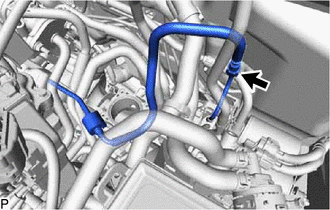
2. DISCONNECT FUEL TUBE SUB-ASSEMBLY
(a) Remove the No. 1 fuel pipe clamp from the fuel tube sub-assembly.
Click here
| (b) Disconnect the fuel tube sub-assembly from the fuel pipe. Click here |
|
3. REMOVE FUEL DELIVERY PIPE
| (a) Disconnect the 4 fuel injector assembly connectors. |
|
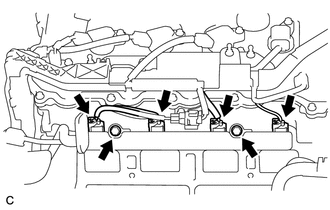
(b) Remove the 2 bolts, and then remove the fuel delivery pipe together with the 4 fuel injector assemblies.
NOTICE:
Be careful not to drop the fuel injector assemblies when removing the fuel delivery pipe.
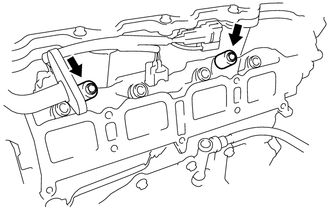
| (c) Remove the 2 fuel delivery pipe spacers from the cylinder head. |
|
4. REMOVE INJECTOR VIBRATION INSULATOR
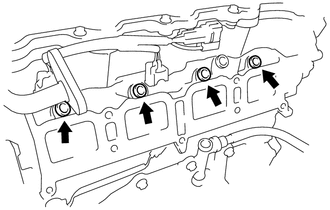
| (a) Remove the 4 injector vibration insulators from the cylinder head. |
|
5. REMOVE FUEL INJECTOR ASSEMBLY
| (a) Pull the 4 fuel injector assemblies out of the fuel delivery pipe. |
|
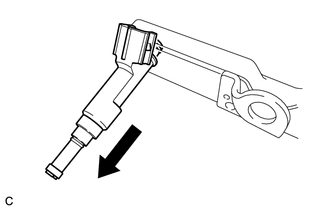
(b) Remove the O-ring from each fuel injector assembly.
NOTICE:
When reinstalling the fuel injector assemblies, mark the cylinder number on the label, etc. and store them in plastic bags to prevent entry of foreign matter.
READ NEXT:
 Inspection
INSPECTION PROCEDURE 1. INSPECT FUEL INJECTOR ASSEMBLY (a) Measure the resistance according to the value(s) in the table below. Standard Resistance: Tester Connection Condition Specified Condi
Installation
INSTALLATION CAUTION / NOTICE / HINT HINT: Perform "Inspection After Repair" after replacing the fuel injector assembly. Click here PROCEDURE 1. INSTALL FUEL INJECTOR ASSEMBLY HINT: Perform "Inspect
Fuel Pressure Regulator
ComponentsCOMPONENTS ILLUSTRATION *1 FUEL PRESSURE REGULATOR ASSEMBLY *2 FUEL PUMP ASSEMBLY WITH FILTER *3 NO. 1 FUEL SUB-TANK *4 NO. 1 FUEL SUCTION SUPPORT *5 FUEL SUCTION
SEE MORE:
Illumination for Panel Switch does not Come on with Tail Switch ON
CAUTION / NOTICE / HINT NOTICE: When replacing the radio receiver assembly, always replace it with a new one. If a radio receiver assembly which was installed to another vehicle is used, the following may occur:
A communication malfunction DTC may be stored.
The radio receiver assembly may not
Components
COMPONENTS ILLUSTRATION *1 DECK TRIM SIDE PANEL ASSEMBLY RH *2 LUGGAGE HOLD BELT STRIKER ASSEMBLY *3 NO. 1 LUGGAGE COMPARTMENT TRIM HOOK *4 PARKING ASSIST ECU *5 REAR DOOR OPENING TRIM WEATHERSTRIP RH *6 REAR FLOOR FINISH PLATE *7 ROPE HOOK ASSEMBLY *8 UPPER D
