
Lexus NX: Removal
REMOVAL
CAUTION / NOTICE / HINT
HINT:
- Use the same procedure for the RH and LH sides.
- The procedure listed below is for the LH side.
PROCEDURE
1. REMOVE ROOF RACK ASSEMBLY (w/ Roof Rack)
Click here .gif)
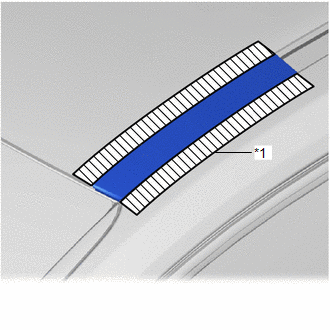
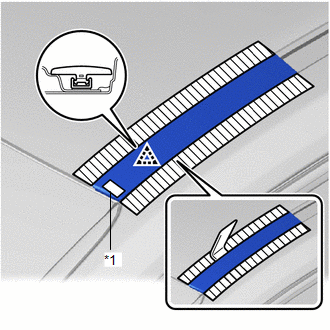
2. REMOVE ROOF DRIP SIDE FINISH MOULDING LH (w/ Roof Rack)
| (a) Put protective tape around the roof drip side finish moulding LH. |
|
| (b) Using moulding remover D, detach the clip and remove the roof drip side finish moulding LH. |
|
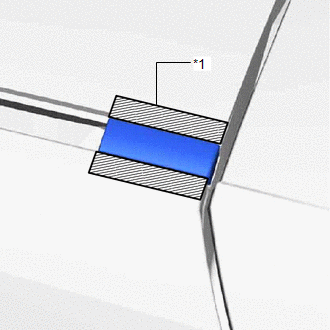
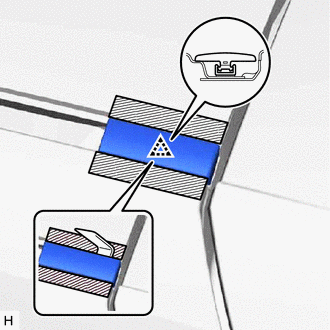
3. REMOVE REAR ROOF DRIP SIDE FINISH MOULDING LH (w/ Roof Rack)
| (a) Put protective tape around the rear roof drip side finish moulding LH. |
|
| (b) Using moulding remover D, detach the clip and remove the rear roof drip side finish moulding LH. |
|
4. REMOVE ROOF DRIP SIDE FINISH MOULDING LH (w/o Roof Rack, except Glass Roof)
| (a) Put protective tape around the roof drip side finish moulding LH. |
|
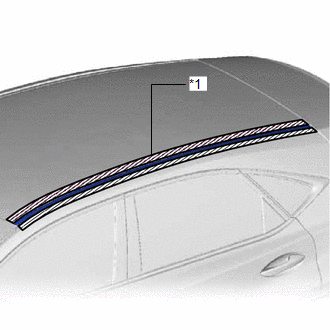
| (b) Using moulding remover D, detach the 2 clips and remove the roof drip side finish moulding LH. |
|
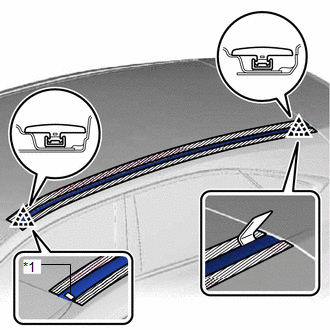
5. REMOVE ROOF DRIP SIDE FINISH MOULDING LH (for Glass Roof)
| (a) Put protective tape around the roof drip side finish moulding LH. |
|
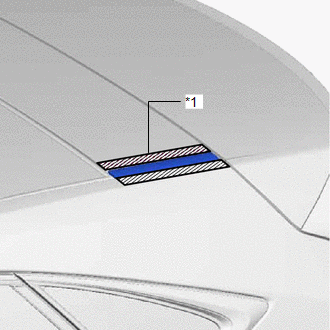
| (b) Using moulding remover D, detach the 2 clips and remove the roof drip side finish moulding LH. |
|
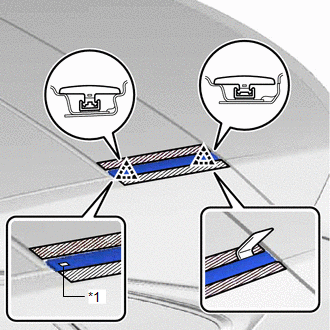
READ NEXT:
 Installation
INSTALLATION CAUTION / NOTICE / HINT HINT:
Use the same procedure for the RH and LH sides.
The procedure listed below is for the LH side.
PROCEDURE 1. INSTALL ROOF DRIP SIDE FINISH MOULDING CL
Removal
REMOVAL CAUTION / NOTICE / HINT HINT:
Use the same procedure for the RH and LH sides.
The procedure listed below is for the LH side.
PROCEDURE 1. REMOVE ROOF HEADLINING ASSEMBLY Click here
SEE MORE:
Customize Parameters
CUSTOMIZE PARAMETERS CUSTOMIZE AFS (ADAPTIVE FRONT-LIGHTING SYSTEM) NOTICE:
When the customer requests a change in a function, first make sure that the function can be customized.
Be sure to make a note of the current settings before customizing.
When troubleshooting a function, first make su
Dtc Check / Clear
DTC CHECK / CLEAR CHECK DTC (a) Connect the Techstream to the DLC3. (b) Turn the power switch on (IG). (c) Turn the Techstream on. (d) Enter the following menus: Body Electrical / Main Body / Trouble Codes. Body Electrical > Main Body > Trouble Codes (e) Check the details of the DTCs. Click he
