
Lexus NX: Removal
REMOVAL
PROCEDURE
1. REMOVE DECK BOARD ASSEMBLY
Click here .gif)
2. REMOVE NO. 3 DECK BOARD SUB-ASSEMBLY
Click here
3. REMOVE REAR DECK FLOOR BOX
Click here
4. REMOVE DECK FLOOR BOX LH
Click here
5. PRECAUTION
CAUTION:
Be sure to read Precaution thoroughly before serving.
Click here
NOTICE:
After turning the power switch off, there may be a waiting time before disconnecting the negative (-) auxiliary battery terminal.
Click here
6. DISCONNECT CABLE FROM NEGATIVE AUXILIARY BATTERY TERMINAL
CAUTION:
- Wait at least 90 seconds after disconnecting the cable from the negative (-) auxiliary battery terminal to disable the SRS system.
- If the airbag deploys for any reason. it may cause a serious accident.
7. REMOVE INSTRUMENT PANEL FINISH PLATE
Click here
8. REMOVE MULTI-DISPLAY ASSEMBLY WITH BRACKET
Click here
9. REMOVE UPPER NO. 1 CONSOLE PANEL GARNISH
Click here
10. REMOVE UPPER NO. 2 CONSOLE PANEL GARNISH
Click here
11. REMOVE INSTRUMENT SIDE PANEL RH
Click here
12. REMOVE INSTRUMENT SIDE PANEL LH
Click here
13. REMOVE NO. 1 INSTRUMENT PANEL SAFETY PAD SUB-ASSEMBLY
Click here
14. REMOVE NO. 1 SWITCH HOLE BASE
Click here
15. REMOVE NO. 1 INSTRUMENT PANEL UNDER COVER SUB-ASSEMBLY
Click here
16. REMOVE LOWER NO. 1 INSTRUMENT PANEL FINISH PANEL
Click here
17. REMOVE NO. 2 INSTRUMENT PANEL SAFETY PAD SUB-ASSEMBLY
Click here
18. REMOVE CENTER INSTRUMENT CLUSTER FINISH PANEL ASSEMBLY
Click here
19. REMOVE SHIFT LEVER KNOB SUB-ASSEMBLY
Click here
20. REMOVE CONSOLE ARMREST ASSEMBLY
Click here
21. REMOVE UPPER REAR CONSOLE PANEL
Click here
22. REMOVE UPPER REAR CONSOLE PANEL SUB-ASSEMBLY
Click here
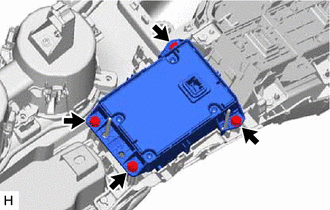
23. REMOVE REMOTE OPERATION CONTROLLER ASSEMBLY
| (a) Remove the 4 bolts and remote operation controller assembly. |
|
READ NEXT:
 Installation
INSTALLATION PROCEDURE 1. INSTALL REMOTE OPERATION CONTROLLER ASSEMBLY (a) Install the remote operation controller assembly with the 4 bolts. 2. INSTALL UPPER REAR CONSOLE PANEL SUB-ASSEMBLY Click her
Telephone Microphone Assembly
ComponentsCOMPONENTS ILLUSTRATION *1 TELEPHONE MICROPHONE ASSEMBLY - -
SEE MORE:
Disassembly
DISASSEMBLY CAUTION / NOTICE / HINT HINT:
Use the same procedure for the RH and LH sides.
The procedure listed below is for the LH side.
PROCEDURE 1. REMOVE FRONT DOOR UPPER OUTSIDE MOULDING PAD (a) Remove the front door upper outside moulding pad.
Problem Symptoms Table
PROBLEM SYMPTOMS TABLE HINT: Use the table below to help determine the cause of problem symptoms. If multiple suspected areas are listed, the potential causes of the symptoms are listed in order of probability in the "Suspected Area" column of the table. Check each symptom by checking the suspected
