
Lexus NX: Removal
REMOVAL
PROCEDURE
1. REMOVE REAR SEAT ASSEMBLY
(a) for Manual Seat:
Click here .gif)
(b) for Power Seat:
Click here
2. REMOVE REAR FLOOR FINISH PLATE
Click here
3. DISCONNECT REAR DOOR OPENING TRIM WEATHERSTRIP RH
Click here
4. REMOVE UPPER DECK TRIM SIDE BOARD RH
Click here
5. REMOVE ROPE HOOK ASSEMBLY
Click here
6. REMOVE LUGGAGE HOLD BELT STRIKER ASSEMBLY
Click here
7. REMOVE NO. 1 LUGGAGE COMPARTMENT TRIM HOOK
Click here
8. REMOVE DECK TRIM SIDE PANEL ASSEMBLY RH
Click here
9. REMOVE BLIND SPOT MONITOR BUZZER
| (a) Disconnect the connector. |
|
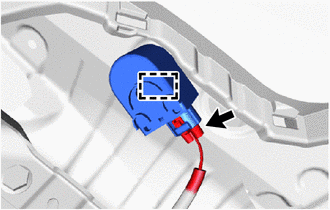
(b) Detach the clamp and remove the blind spot monitor buzzer.
READ NEXT:
 Installation
INSTALLATION PROCEDURE 1. INSTALL BLIND SPOT MONITOR BUZZER (a) Attach the clamp to install the blind spot monitor buzzer. (b) Connect the connector. 2. INSTALL DECK TRIM SIDE PANEL ASSEMBLY RH Click
Television Camera (for Front)
ComponentsCOMPONENTS ILLUSTRATION *1 FRONT TELEVISION CAMERA ASSEMBLY - - RemovalREMOVAL PROCEDURE 1. PRECAUTION Click here 2. REMOVE FRONT BUMPER COVER (a) for Sport Package: Click h
SEE MORE:
Power (ignition) switch
Performing the following operations
when carrying the electronic
key on your person starts the hybrid
system or changes power switch
modes.
Starting the hybrid system
1. Check that the parking brake is set.
2. Check that the shift lever is in P.
3. Firmly depress the brake pedal.
and
Back Door Closer Operation Malfunction (B2250)
DESCRIPTION The multiplex network door ECU receives signals from the latch switch, initial switch, pawl switch and back door courtesy switch, which are built into the back door lock assembly. Based on these switch signals, the latch position of the back door lock assembly is determined. DTC No.
© 2016-2026 Copyright www.lexunx.com
