
Lexus NX: System Diagram
Lexus NX Service Manual / Vehicle Interior / Seat / Front Power Seat Control System(w/o Memory) / System Diagram
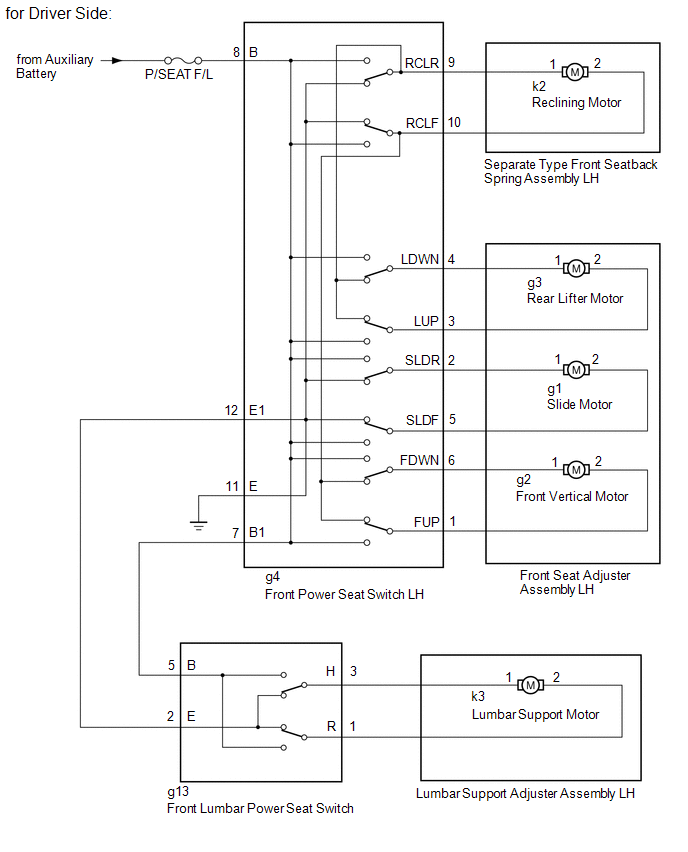
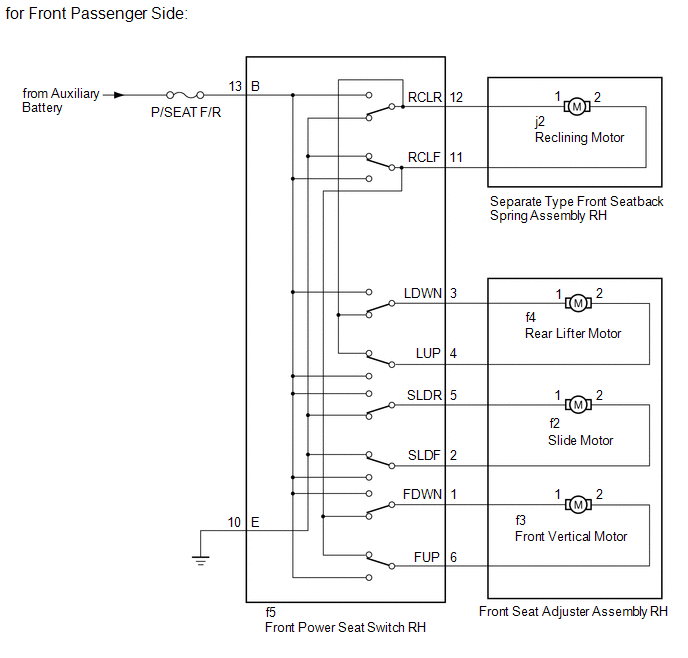
SYSTEM DIAGRAM
READ NEXT:
 Operation Check
OPERATION CHECK CHECK POWER SEAT FUNCTION *A for Driver Side *a Slide Function *b Reclining Function *c Rear Lifter Function *d Front Vertical Function *e Lumbar Su
Problem Symptoms Table
PROBLEM SYMPTOMS TABLE HINT: Use the table below to help determine the cause of problem symptoms. If multiple suspected areas are listed, the potential causes of the symptoms are listed in order of pr
SEE MORE:
Open in Outside Luggage Compartment Electrical Key Antenna Circuit (B27A8)
DESCRIPTION The certification ECU (smart key ECU assembly) generates a request signal and transmits the signal to the electrical key antenna (outside luggage compartment). For the electrical key antenna (outside luggage compartment) to detect when the electrical key transmitter sub-assembly is broug
Communication Malfunction (A/C Inverter Local) (B1498)
DESCRIPTION The hybrid vehicle control ECU and compressor with motor assembly communicate via a direct line. Compressor control is stopped and this DTC is stored if communication information is cut off or abnormal information occurs. This DTC is also detected if high-voltage power supplied from the
© 2016-2026 Copyright www.lexunx.com
