
- Back door courtesy switch signal
- Vehicle information signal
Lexus NX: System Diagram
Lexus NX Service Manual / Audio & Visual & Telematics / Park Assist / Monitoring / Parking Assist Monitor System / System Diagram
SYSTEM DIAGRAM
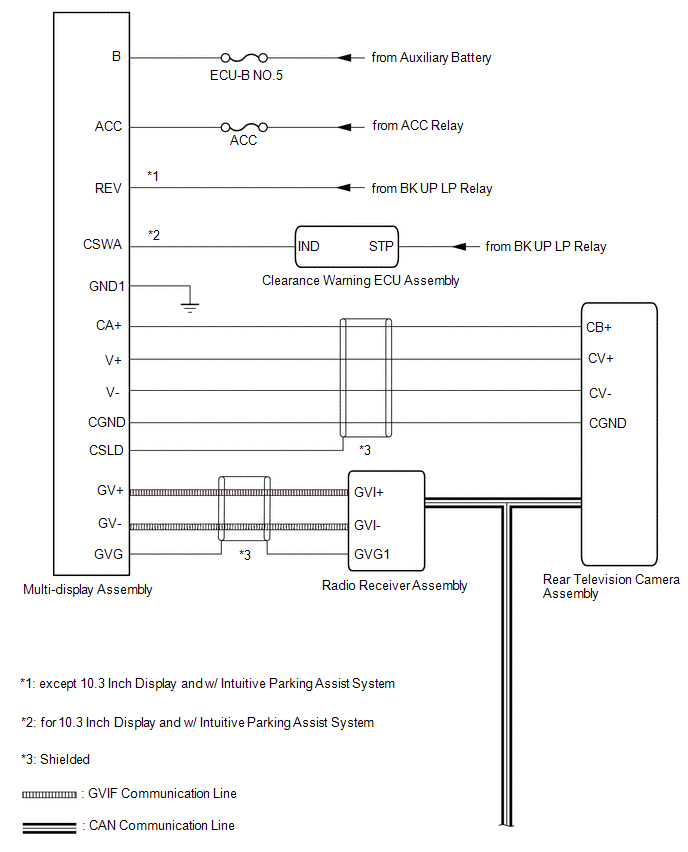
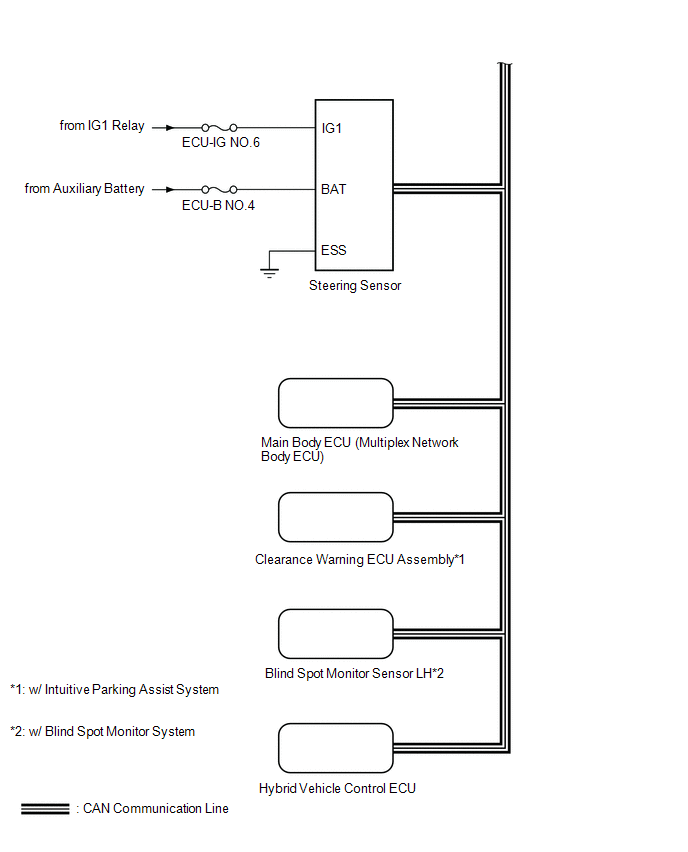 Communication Table
 | Sender | Receiver | Signal | Line |
|---|---|---|---|
| Radio Receiver Assembly | Multi-display assembly | Camera information signal | GVIF Cable |
| Radio Receiver Assembly | Rear Television Camera Assembly | Camera information signal | CAN Communication Line |
| Steering Sensor | Rear Television Camera Assembly | Steering angle signal | CAN Communication Line |
| Hybrid Vehicle Control ECU | Rear Television Camera Assembly | Vehicle information signal | CAN Communication Line |
| Main Body ECU (Multiplex Network Body ECU) | Rear Television Camera Assembly | | CAN Communication Line |
| Clearance Warning ECU Assembly*1 | Rear Television Camera Assembly | Sonar information signal | CAN Communication Line |
| Blind Spot Monitor Sensor LH*2 | Rear Television Camera Assembly | RCTA operation condition signal | CAN Communication Line |
- *1: w/ Intuitive Parking Assist System
- *2: w/ Blind Spot Monitor System
READ NEXT:
 System Description
SYSTEM DESCRIPTION GENERAL (a) This system has a rear television camera assembly mounted on the back door to display an image of the area behind the vehicle on the display. The display panel also show
How To Proceed With Troubleshooting
CAUTION / NOTICE / HINT HINT:
Use the following procedure to troubleshoot the parking assist monitor system.
*: Use the Techstream.
PROCEDURE 1. VEHICLE BROUGHT TO WORKSHOP
NEXT
Initialization
INITIALIZATION INITIALIZE PARKING ASSIST MONITOR SYSTEM (a) When the "!" mark is displayed on the multi-display assembly, correct the steering angle neutral point using the following method. (1) Fully
SEE MORE:
Disassembly
DISASSEMBLY CAUTION / NOTICE / HINT HINT:
Use the same procedure for the RH and LH sides.
The procedure listed below is for the LH side.
PROCEDURE 1. REMOVE OUTER MIRROR LH Click here 2. REMOVE SIDE TURN SIGNAL LIGHT ASSEMBLY LH Click here 3. REMOVE SIDE TELEVISION CAMERA ASSEMBLY LH (w/
Installation
INSTALLATION PROCEDURE 1. PRECAUTION CAUTION: Be sure to read precaution thoroughly before servicing. Click here 2. INSTALL REAR TIRE PRESSURE MONITOR INITIATOR (a) Install the rear tire pressure monitor initiator with the 2 nuts. Torque: 8.3 N·m {85 kgf·cm, 73 in·lbf} (b) Connect the grommet.
© 2016-2026 Copyright www.lexunx.com
