
Lexus NX: Components
Lexus NX Service Manual / Vehicle Interior / Interior Panels / Trim / Combination Switch / Components
COMPONENTS
ILLUSTRATION
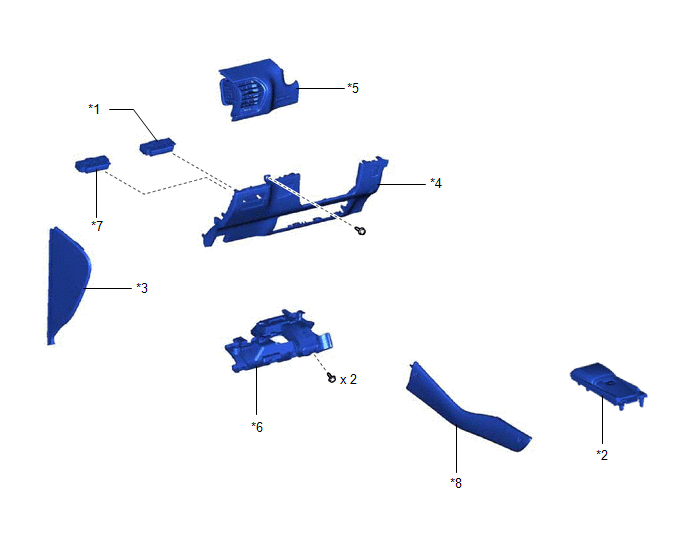
| *1 | COMBINATION SWITCH ASSEMBLY | *2 | CONSOLE ARMREST ASSEMBLY |
| *3 | INSTRUMENT SIDE PANEL LH | *4 | LOWER NO. 1 INSTRUMENT PANEL FINISH PANEL |
| *5 | NO. 1 INSTRUMENT PANEL SAFETY PAD SUB-ASSEMBLY | *6 | NO. 1 INSTRUMENT PANEL UNDER COVER SUB-ASSEMBLY |
| *7 | NO. 2 COMBINATION SWITCH ASSEMBLY | *8 | UPPER NO. 2 CONSOLE PANEL GARNISH |
READ NEXT:
 Removal
REMOVAL PROCEDURE 1. REMOVE CONSOLE ARMREST ASSEMBLY Click here 2. REMOVE UPPER NO. 2 CONSOLE PANEL GARNISH Click here 3. REMOVE INSTRUMENT SIDE PANEL LH Click here 4. REMOVE NO. 1 INSTRUM
Installation
INSTALLATION PROCEDURE 1. INSTALL COMBINATION SWITCH ASSEMBLY (for Upper Side) (a) Attach the 4 claws to install the combination switch assembly. 2. INSTALL NO. 2 COMBINATION SWITCH ASS
SEE MORE:
Dtc Check / Clear
DTC CHECK / CLEAR CHECK DTC (a) Connect the Techstream to the DLC3. (b) Turn the power switch on (IG). (c) Turn the Techstream on. (d) Enter the following menus: Body Electrical / Main Body / Trouble Codes. Body Electrical > Main Body > Trouble Codes (e) Check for DTCs. CLEAR DTC (a) Connect t
Problem Symptoms Table
PROBLEM SYMPTOMS TABLE HINT: Use the table below to help determine the cause of problem symptoms. If multiple suspected areas are listed, the potential causes of the symptoms are listed in order of probability in the "Suspected Area" column of the table. Check each symptom by checking the suspected
© 2016-2026 Copyright www.lexunx.com
