
Lexus NX: Components
Lexus NX Service Manual / Vehicle Interior / Lighting (int) / Back Door Courtesy Switch / Components
COMPONENTS
ILLUSTRATION
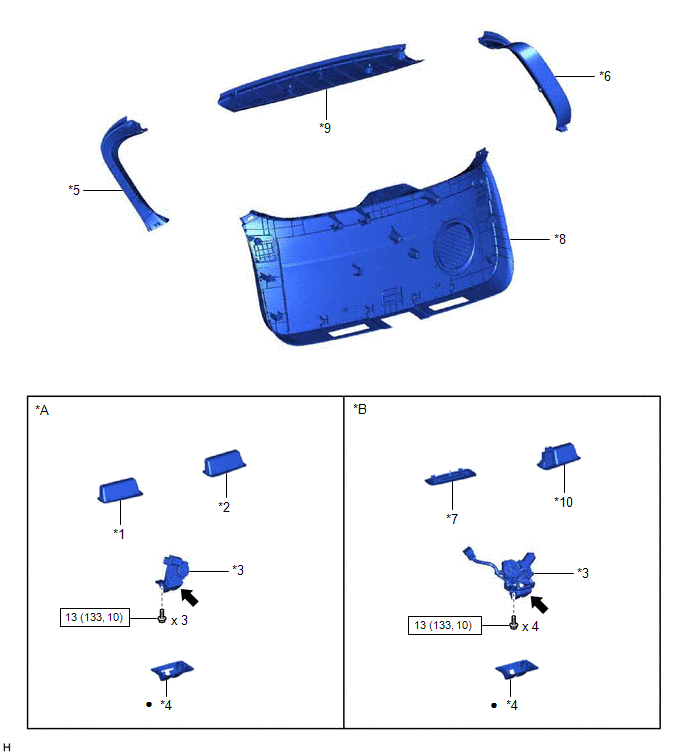
| *A | w/o Power Back Door | *B | w/ Power Back Door |
| *1 | BACK DOOR FINISH COVER LH | *2 | BACK DOOR FINISH COVER RH |
| *3 | BACK DOOR LOCK ASSEMBLY (BACK DOOR COURTESY SWITCH) | *4 | BACK DOOR LOCK COVER |
| *5 | BACK DOOR SIDE GARNISH LH | *6 | BACK DOOR SIDE GARNISH RH |
| *7 | BACK DOOR TRIM BASE | *8 | BACK DOOR TRIM BOARD ASSEMBLY |
| *9 | CENTER BACK DOOR GARNISH | *10 | PULL HANDLE |
.png) | N*m (kgf*cm, ft.*lbf) : Specified torque | ● | Non-reusable part |
.png) | MP grease | - | - |
READ NEXT:
 Removal
REMOVAL PROCEDURE 1. REMOVE CENTER BACK DOOR GARNISH Click here 2. REMOVE BACK DOOR SIDE GARNISH LH Click here 3. REMOVE BACK DOOR SIDE GARNISH RH Click here 4. REMOVE BACK DOOR FINISH COVER
Inspection
INSPECTION PROCEDURE 1. INSPECT BACK DOOR LOCK ASSEMBLY (BACK DOOR COURTESY SWITCH) (a) w/o Power Back Door: (1) Move the back door lock assembly to the lock position. *1 Latch *
Installation
INSTALLATION PROCEDURE 1. INSTALL BACK DOOR LOCK ASSEMBLY (BACK DOOR COURTESY SWITCH) HINT:
When installing a new back door lock assembly (back door courtesy switch), if there is a rope on the asse
SEE MORE:
Hybrid Battery System Discharge Time Too Long (P0C76-523)
DTC SUMMARY MALFUNCTION DESCRIPTION The hybrid vehicle control ECU detects that the electrical charge stored in the high-voltage condenser of the inverter with converter assembly cannot be discharged. The cause of this malfunction may be one of the following: Inside of inverter voltage sensor (VH)
Parts Location
PARTS LOCATION ILLUSTRATION *1 POWER STEERING ECU ASSEMBLY *2 ELECTRIC POWER STEERING COLUMN SUB-ASSEMBLY - POWER STEERING MOTOR ASSEMBLY - MOTOR ROTATION ANGLE SENSOR - TORQUE SENSOR - ECU WIRE SUB-ASSEMBLY *3 SKID CONTROL ECU (BRAKE BOOSTER WITH MASTER CYLINDER ASSEMBLY) *4 NO.
© 2016-2026 Copyright www.lexunx.com
