
Lexus NX: Components
COMPONENTS
ILLUSTRATION
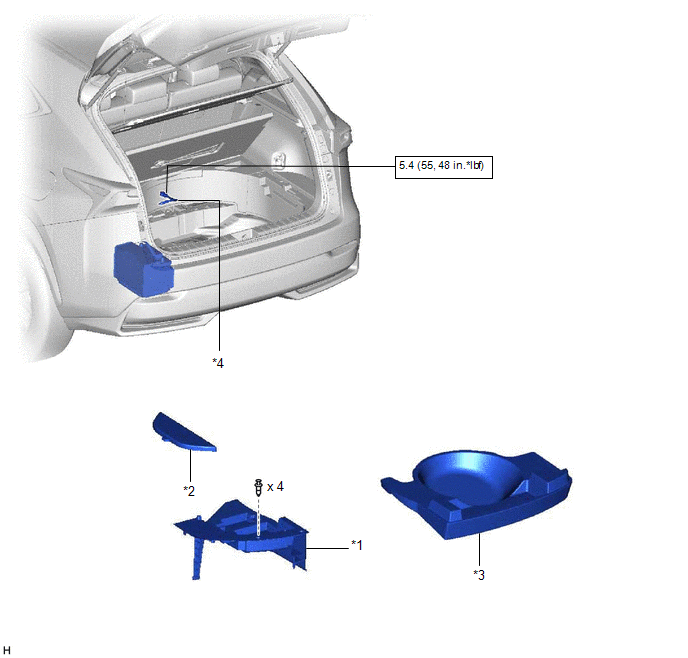
| *1 | DECK FLOOR BOX LH | *2 | NO. 3 DECK BOARD SUB-ASSEMBLY |
| *3 | REAR DECK FLOOR BOX | *4 | AUXILIARY BATTERY NEGATIVE TERMINAL |
.png) | N*m (kgf*cm, ft.*lbf): Specified torque | - | - |
ILLUSTRATION
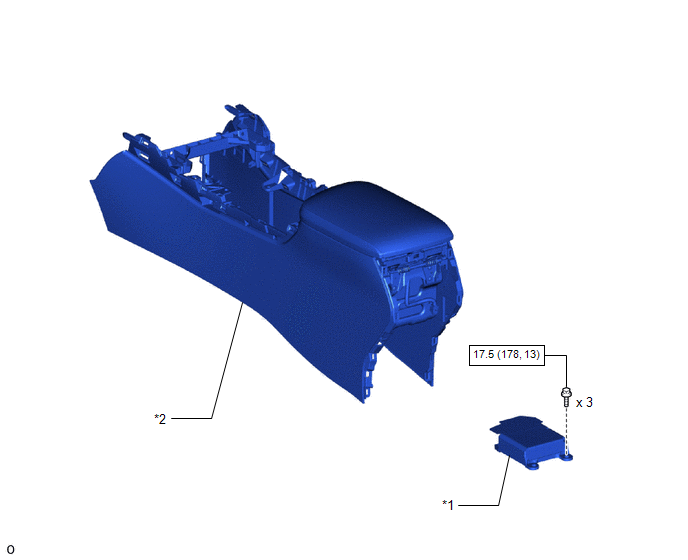
| *1 | AIRBAG ECU ASSEMBLY | *2 | FRONT CONSOLE BOX |
| | N*m (kgf*cm, ft.*lbf): Specified torque | - | - |
READ NEXT:
 On-vehicle Inspection
ON-VEHICLE INSPECTION CAUTION / NOTICE / HINT CAUTION: Be sure to follow the correct removal and installation procedures of the airbag ECU assembly. PROCEDURE 1. INSPECT AIRBAG ECU ASSEMBLY (for Vehic
Removal
REMOVAL PROCEDURE 1. REMOVE NO. 3 DECK BOARD SUB-ASSEMBLY Click here 2. REMOVE REAR DECK FLOOR BOX Click here 3. REMOVE DECK FLOOR BOX LH Click here 4. PRECAUTION CAUTION: Be sure to read Precau
Installation
INSTALLATION PROCEDURE 1. INSTALL AIRBAG ECU ASSEMBLY (a) Check that the power switch is off. (b) Check that the cable is disconnected from the negative (-) auxiliary battery terminal. CAUTION: Wait a
SEE MORE:
Adjustment
ADJUSTMENT PROCEDURE 1. INSPECT SHIFT LEVER POSITION (a) While moving the shift lever from N to each position, check that the lever moves smoothly and that the shift position indicator comes on properly according to the shift lever position. (b) Put the vehicle into the READY-on state and check the
Parts Location
PARTS LOCATION ILLUSTRATION *1 FRONT DOOR COURTESY LIGHT SWITCH ASSEMBLY LH *2 MAP LIGHT ASSEMBLY *3 SLIDE ROOF SWITCH *4 SLIDING ROOF DRIVE GEAR SUB-ASSEMBLY
- SLIDING ROOF ECU
- SLIDE MOTOR
*5 COMBINATION METER ASSEMBLY *6 INSTRUMENT PANEL JUNCTION BLOCK ASSEM
© 2016-2026 Copyright www.lexunx.com
