
Lexus NX: High Mounted Stop Light Assembly
Components
COMPONENTS
ILLUSTRATION
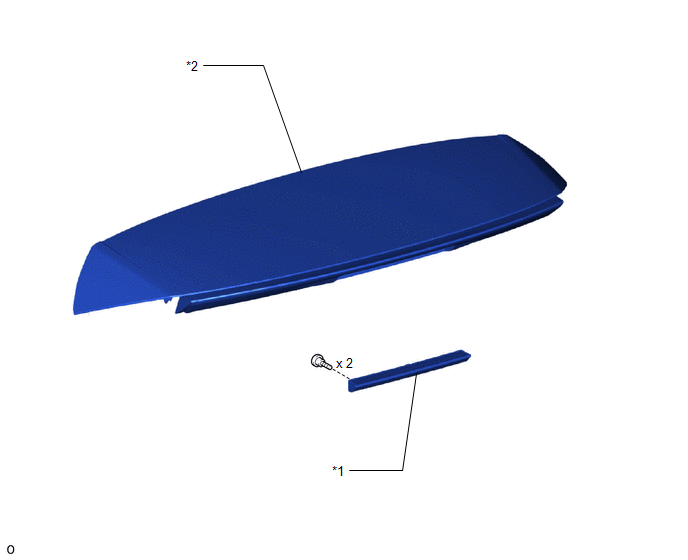
| *1 | CENTER STOP LIGHT ASSEMBLY | *2 | REAR SPOILER ASSEMBLY |
Removal
REMOVAL
PROCEDURE
1. REMOVE REAR SPOILER ASSEMBLY
Click here .gif)
2. REMOVE CENTER STOP LIGHT ASSEMBLY
| (a) Remove the 2 screws and center stop light assembly. |
|
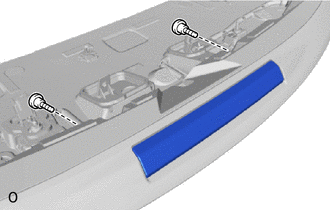
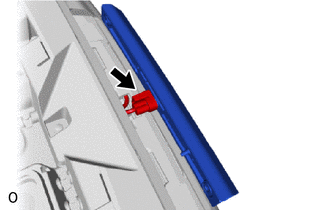
| (b) Disconnect the connector. |
|
Inspection
INSPECTION
PROCEDURE
1. INSPECT CENTER STOP LIGHT ASSEMBLY
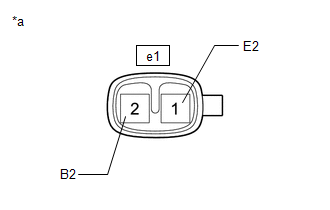
| (a) Apply auxiliary battery voltage to the connector and check the light illumination condition. OK:
If the result is not as specified, replace the center stop light assembly. |
|
Installation
INSTALLATION
PROCEDURE
1. INSTALL CENTER STOP LIGHT ASSEMBLY
(a) Connect the connector.
(b) Install the center stop light assembly with the 2 screws.
2. INSTALL REAR SPOILER ASSEMBLY
Click here .gif)
3. INSPECT CENTER STOP LIGHT
(a) Depress the brake pedal and check that the center stop light illuminates.
READ NEXT:
 Components
COMPONENTS ILLUSTRATION *A w/o Power Back Door System *B w/ Power Back Door System *1 BACK DOOR FINISH COVER LH *2 BACK DOOR FINISH COVER RH *3 BACK DOOR LOCK COVER *4 BA
Removal
REMOVAL CAUTION / NOTICE / HINT HINT:
Use the same procedure for the RH and LH sides.
The procedure described below is for the LH side.
PROCEDURE 1. REMOVE CENTER BACK DOOR GARNISH Click here
SEE MORE:
Short in Motor Circuit (C1521-C1524,C1528,C1531-C1555)
DESCRIPTION The power steering ECU assembly detects steering force using the signal received from the steering torque sensor, and also monitors the motor circuit for errors. DTC No. Detection Item DTC Detection Condition Trouble Area Warning Indicate Return-to-normal Condition Note
Thermostat (P0128)
DESCRIPTION This DTC is stored when the engine coolant temperature does not reach 73°C (163°F) despite sufficient engine warm-up time having elapsed. DTC No. Detection Item DTC Detection Condition Trouble Area MIL Memory P0128 Thermostat All of the following conditions are met
