
Lexus NX: Removal
REMOVAL
PROCEDURE
1. REMOVE NO. 2 FORWARD RECOGNITION COVER
Click here .gif)
2. REMOVE NO. 1 FORWARD RECOGNITION COVER
Click here
3. REMOVE PROTECTOR
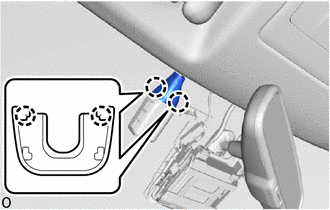
(a) Detach the 2 claws and remove the protector.
4. REMOVE AIR CONDITIONING THERMISTOR ASSEMBLY (HUMIDITY SENSOR)
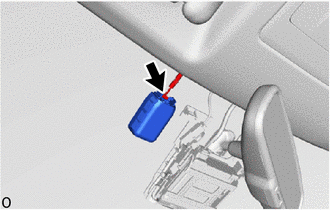
(a) Disconnect the connector.
| (b) Release the stopper by pulling it down. |
|
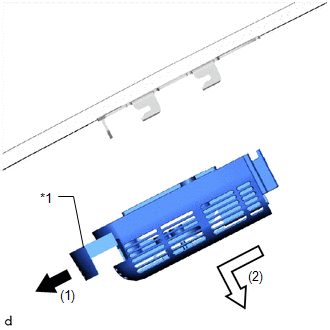
(c) Remove the air conditioning thermistor assembly (humidity sensor) as shown in the illustration.
READ NEXT:
 Inspection
INSPECTION PROCEDURE 1. INSPECT AIR CONDITIONING THERMISTOR ASSEMBLY (HUMIDITY SENSOR) (a) for Glass temperature sensor: (1) Measure the resistance according to the value(s) in the table below. *a
Installation
INSTALLATION PROCEDURE 1. INSTALL AIR CONDITIONING THERMISTOR ASSEMBLY (HUMIDITY SENSOR) *1 Stopper *2 Bracket (a) Attach the 2 brackets, and carefully install the air conditioning ther
SEE MORE:
Sound Signal Circuit between Radio Receiver and Stereo Jack Adapter
DESCRIPTION The No. 1 stereo jack adapter assembly sends the sound signal from an external device to the radio receiver assembly via this circuit. The sound signal that has been sent is amplified by the stereo component amplifier assembly and then is sent to the speakers. If there is an open or shor
Windshield Deicer does not Operate
DESCRIPTION When the windshield deicer switch is operated, the operation signal is transmitted to the radio receiver assembly. The radio receiver assembly transmits the operation signal to the air conditioning amplifier assembly via the CAN communication line. WIRING DIAGRAM CAUTION / NOTICE / HINT
© 2016-2026 Copyright www.lexunx.com
