
Lexus NX: Removal
REMOVAL
PROCEDURE
1. REMOVE CONSOLE ARMREST ASSEMBLY
Click here .gif)
2. REMOVE UPPER NO. 2 CONSOLE PANEL GARNISH
Click here
3. REMOVE INSTRUMENT SIDE PANEL LH
Click here
4. REMOVE NO. 1 INSTRUMENT PANEL SAFETY PAD SUB-ASSEMBLY
Click here
5. REMOVE NO. 1 INSTRUMENT PANEL UNDER COVER SUB-ASSEMBLY
Click here
6. REMOVE LOWER NO. 1 INSTRUMENT PANEL FINISH PANEL
Click here
7. REMOVE NO. 1 SWITCH HOLE BASE
Click here
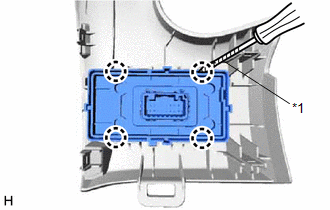
8. REMOVE HEADUP DISPLAY SWITCH ASSEMBLY
| (a) Using a screwdriver, detach the 4 claws and remove the headup display switch assembly. HINT: Tape the screwdriver tip before use. |
|
READ NEXT:
 Inspection
INSPECTION PROCEDURE 1. INSPECT HEADUP DISPLAY SWITCH ASSEMBLY *1 HUD Switch *2 TILT Switch *3 RHEOSTAT Switch *4 DISP Switch *a Component without harness connected (Head
Installation
INSTALLATION PROCEDURE 1. INSTALL HEADUP DISPLAY SWITCH ASSEMBLY (a) Attach the 4 claws to install the headup display switch assembly. 2. INSTALL NO. 1 SWITCH HOLE BASE Click here 3
SEE MORE:
Display Disconnected (B15D6)
DESCRIPTION The multi-display assembly and radio receiver assembly are connected by the AVC-LAN communication line. This DTC is stored when an AVC-LAN communication error occurs between the multi-display assembly and radio receiver assembly. DTC No. Detection Item DTC Detection Condition Tr
Customize Parameters
CUSTOMIZE PARAMETERS CUSTOMIZE LANE TRACING ASSIST SYSTEM (w/ Lane Centering Function) NOTICE:
When the customer requests a change in a function, first make sure that the function can be customized.
Be sure to make a note of the current settings before customizing.
When troubleshooting a func
© 2016-2026 Copyright www.lexunx.com
