
Lexus NX: Removal
REMOVAL
PROCEDURE
1. PRECAUTION
Click here .gif)
2. REMOVE REAR BUMPER COVER
Click here
3. REMOVE NO. 2 LUGGAGE ROOM WIRE
Click here
4. REMOVE REAR CORNER ULTRASONIC SENSOR
| (a) Detach the 2 claws and remove the rear corner ultrasonic sensor. HINT:
|
|
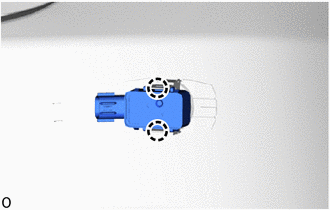
5. REMOVE REAR CENTER ULTRASONIC SENSOR
HINT:
Use the same procedure described for the rear corner ultrasonic sensor.
6. REMOVE REAR CORNER ULTRASONIC SENSOR RETAINER
HINT:
- When removing the rear corner ultrasonic sensor retainer, heat the rear bumper assembly and rear corner ultrasonic sensor retainer using a heat light.
- Use the same procedure for both rear corner ultrasonic sensor retainers.
Standard:
| Item | Temperature |
|---|---|
| Rear Bumper Assembly | 20 to 30°C (68 to 86°F) |
| Rear Corner Ultrasonic Sensor Retainer |
NOTICE:
- Do not heat the rear bumper assembly on rear corner ultrasonic sensor retainer excessirely.
- Do not reuse the removed rear corner ultrasonic sensor retainer.
| (a) Remove the rear corner ultrasonic sensor retainer. |
|
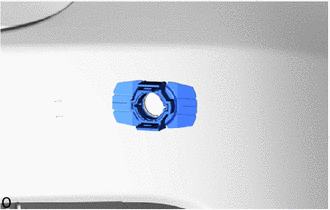
7. REMOVE REAR CENTER ULTRASONIC SENSOR RETAINER
HINT:
Use the same procedure described for the rear corner ultrasonic sensor retainer.
8. REMOVE ULTRASONIC SENSOR CUSHION SET
HINT:
Perform the following procedure only when replacement of a ultrasonic sensor cushion set is necessary.
(a) Remove the ultrasonic sensor cushion set as shown in the illustration.
.png)
.png) | Remove in this Direction | - | - |
READ NEXT:
 Inspection
INSPECTION PROCEDURE 1. INSPECT REAR CENTER ULTRASONIC SENSOR (a) Measure the resistance according to the value(s) in the table below. Standard Resistance: Tester Connection Condition Speci
Installation
INSTALLATION PROCEDURE 1. INSTALL ULTRASONIC SENSOR CUSHION SET HINT: Perform the following procedure only when replacement of a ultrasonic sensor cushion set is necessary. (a) Install the ultrasonic
SEE MORE:
Precaution
PRECAUTION PRECAUTIONS DURING REPLACEMENT NOTICE: When replacing electronic parts, if there is a possibility that your body may contact a circuit board, etc., use the recommended tools and observe all precautions to prevent damage to the system by electrostatic discharge (ESD). (a) Procedures where
Components
COMPONENTS ILLUSTRATION *1 DECK FLOOR BOX LH *2 NO. 3 DECK BOARD SUB-ASSEMBLY *3 REAR DECK FLOOR BOX *4 AUXILIARY BATTERY NEGATIVE TERMINAL N*m (kgf*cm, ft.*lbf): Specified torque - - ILLUSTRATION *1 FRONT SEAT ASSEMBLY RH *2 OCCUPANT DETECTION ECU
