
Lexus NX: Installation
INSTALLATION
PROCEDURE
1. INSTALL RAIN SENSOR TAPE
NOTICE:
The rain sensor tape is reusable. Only replace the tape if it is damaged or contaminated.
(a) Clean the rain sensor sensing portion with a piece of cloth, etc.
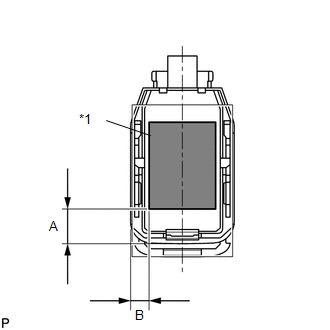
| (b) Peel off the smaller release sheet, and then attach the rain sensor tape on the rain sensor sensing portion as shown in the illustration. Standard:
NOTICE: Use your fingers to push out any air bubbles from under the tape. |
|
2. INSTALL RAIN SENSOR
(a) Clean the windshield glass with a piece of cloth, etc.
NOTICE:
- Make sure that there is no rain sensor tape residue remaining on the windshield glass. If there is, remove the residue.
- If there is any rain sensor tape residue remaining on the windshield glass, replace the tape.
(b) When installing a new rain sensor or replacing the rain sensor tape:
(1) Peel off the release sheet.
HINT:
Do not touch the silicon coated surfaces.
| (2) Attach the 2 guides, and then carefully install the rain sensor to the glass surface so that air bubbles do not form between the contact surfaces. NOTICE: Do not touch the silicon coated or glass surfaces. |
|
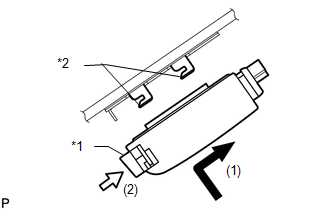
(3) Push in the stopper.
(4) Connect the connector.
3. INSTALL RAIN SENSOR COVER
(a) Attach the 2 claws to install the rain sensor cover.
READ NEXT:
 Components
COMPONENTS ILLUSTRATION *A w/ Woofer *B w/o Woofer *C w/o Power Back Door *D w/ Power Back Door *1 BACK DOOR CENTER GARNISH *2 BACK DOOR FINISH COVER LH *3 BACK DOO
On-vehicle Inspection
ON-VEHICLE INSPECTION PROCEDURE 1. INSPECT REAR WIPER MOTOR ASSEMBLY (a) Check the automatic stop (park) position. (1) Operate the rear wiper motor assembly, and then stop the operation. Check the
SEE MORE:
System Description
SYSTEM DESCRIPTION
The power steering system generates torque through the operation of the motor and the reduction gear installed on the column shaft in order to assist steering effort.
The power steering ECU assembly determines the direction and amount of assist power in accordance with vehicl
Operation Check
OPERATION CHECK REMOTE TOUCH SELF CHECK NOTICE:
Before entering self-diagnostic mode, make sure there are no obstacles which may interfere with operation of the remote touch screen, and that the touch screen is not dirty.
Do not touch the touch screen except when required.
Since the remote to
