
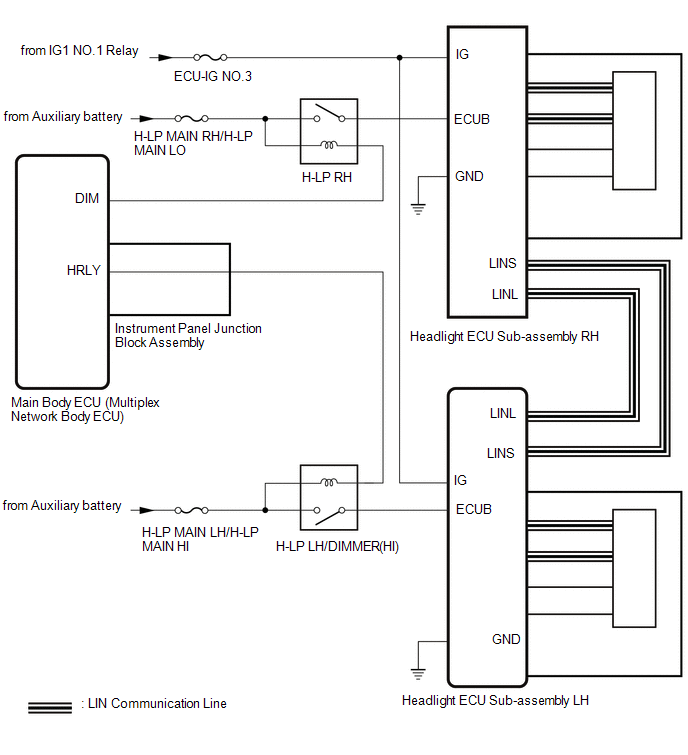
Lexus NX: System Diagram
Lexus NX Service Manual / Vehicle Exterior / Lighting (ext) / Afs (adaptive Front-lighting System) / System Diagram
SYSTEM DIAGRAM
READ NEXT:
 How To Proceed With Troubleshooting
CAUTION / NOTICE / HINT HINT:
Use the following procedure to troubleshoot the AFS (front-lighting adaptive system).
*: Use the Techstream
PROCEDURE 1. VEHICLE BROUGHT TO WORKSHOP
Operation Check
OPERATION CHECK AFS (FRONT-LIGHTING ADAPTIVE SYSTEM) OPERATION CHECK NOTICE: Make sure that the customize settings are set to default when performing the AFS (front-lighting adaptive system) operation
Customize Parameters
CUSTOMIZE PARAMETERS CUSTOMIZE AFS (ADAPTIVE FRONT-LIGHTING SYSTEM) NOTICE:
When the customer requests a change in a function, first make sure that the function can be customized.
Be sure to make
SEE MORE:
Fail-safe Chart
FAIL-SAFE CHART FAIL-SAFE FUNCTION (a) If a malfunction is detected in the intelligent clearance sonar system, the warning message "Parking Support Brake System Malfunction Visit Your Dealer" or "Parking Support Brake Unavailable" is displayed on the multi-information display, the ICS OFF indicator
Terminals Of Ecu
TERMINALS OF ECU CHECK ABSORBER CONTROL ECU *a Component with harness connected (Absorber Control ECU) - - HINT:
Inspect the connectors from the back side while the connectors are connected.
Check the operation of a particular valve by listening for operating sounds or by using the
© 2016-2026 Copyright www.lexunx.com
